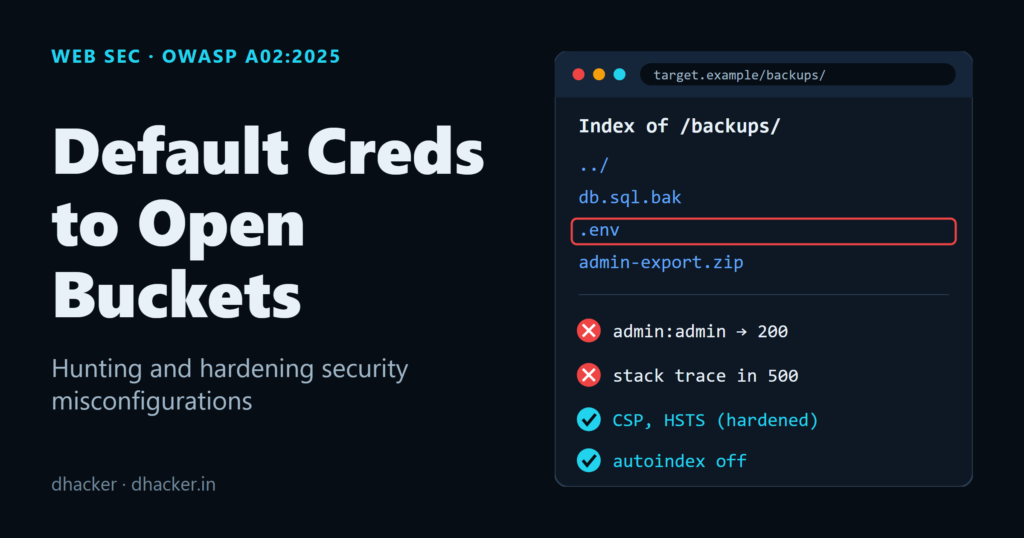
Most breaches don’t start with a zero-day. They start with a directory listing nobody disabled, a stack trace that leaks a database connection string, or an admin console someone meant to lock down "later." OWASP’s 2025 Top 10 puts Security Misconfiguration at #2, up from #5 in 2021 — a jump the project attributes to growing attack surface from cloud services, containers, and framework defaults that are insecure out of the box. In this lab you’ll stand up a deliberately misconfigured Docker Compose stack, find every issue with curl and a repeatable bash scanner, then flip to a hardened configuration and prove the fixes hold.
Why misconfiguration jumped to #2
The OWASP A02:2025 page maps Security Misconfiguration to 16 CWEs and reports it affects 100% of tested applications, with a maximum observed incidence rate of 27.70% and 719,084 total occurrences across the dataset. It carries an exploit score of 7.96 and an impact score of 3.97 — high exploitability because most misconfigurations require no custom exploit code, just a browser or curl.
The root cause isn’t exotic. Modern stacks ship more moving parts — reverse proxies, container images, cloud storage, admin panels — and each one has its own set of insecure defaults. Directory listing, verbose debug pages, and missing security headers are "off by default" in theory but creep back in during local debugging, rushed deployments, or copy-pasted configs that never get revisited.
Lab architecture
The lab is a two-container Compose stack:
app— a Flask application (AcmeCorp Internal Portal) with a login form, an unauthenticated/adminconsole, a/admin/configendpoint that dumps secrets as JSON, and an/error-demoroute that callseval()on user input to trigger a debug traceback.nginx— fronts the Flask app and either amplifies the problems (vulnerable config) or neutralizes them (hardened config).
default-creds-to-open-buckets/
├── app/                        # Flask application (vulnerable by default)
│   ├── app.py
│   ├── Dockerfile
│   └── static/reports/         # "confidential" CSV reports
├── nginx/
│   ├── vulnerable/nginx.conf   # directory listing, no headers, no error interception
│   └── hardened/nginx.conf     # headers, blocked routes, generic errors
├── scripts/check-misconfigs.sh # automated curl-based checker
├── docker-compose.yml          # vulnerable stack
└── docker-compose.hardened.yml # hardened stack
Start it with Docker Compose, bound to localhost only:
docker compose up --build -dThe portal comes up at http://127.0.0.1:8080 with a visible debug banner warning you that stack traces are live.
Hunting the misconfigurations
1. Directory listing (CWE-548: Exposure of Information Through Directory Listing)
The vulnerable nginx/vulnerable/nginx.conf turns on autoindex for the /files/ path, which is mapped straight to the app’s report folder:
location /files/ {
    alias /usr/share/nginx/html/files/;
    autoindex on;
    autoindex_exact_size on;
    autoindex_localtime on;
}
curl -s http://127.0.0.1:8080/files/<html>
<head><title>Index of /files/</title></head>
<body>
<h1>Index of /files/</h1><hr><pre><a href="../">../</a>
<a href="employees.csv">employees.csv</a> 07-Oct-2026 21:38 243
<a href="q3-revenue.csv">q3-revenue.csv</a> 07-Oct-2026 21:38 162
<a href="servers.csv">servers.csv</a> 07-Oct-2026 21:38 232
</pre><hr></body>
</html>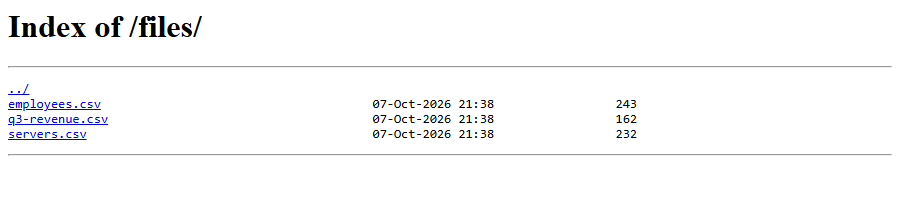
Three "confidential" files — an employee directory, a revenue summary, and a server inventory — are sitting there for anyone who guesses or finds the /files/ path.
2. Verbose, debug-mode error pages (CWE-209 / CWE-497: Exposure of Sensitive Information)
The app runs with APP_DEBUG=true by default and the /error-demo route calls eval() directly on the input query parameter, which is itself an injection flaw layered on top of the misconfiguration:
curl -s "http://127.0.0.1:8080/error-demo?input=invalid"The response is a full Python traceback rendered to the browser — file paths, line numbers, the exact eval(data) call, and the underlying NameError:
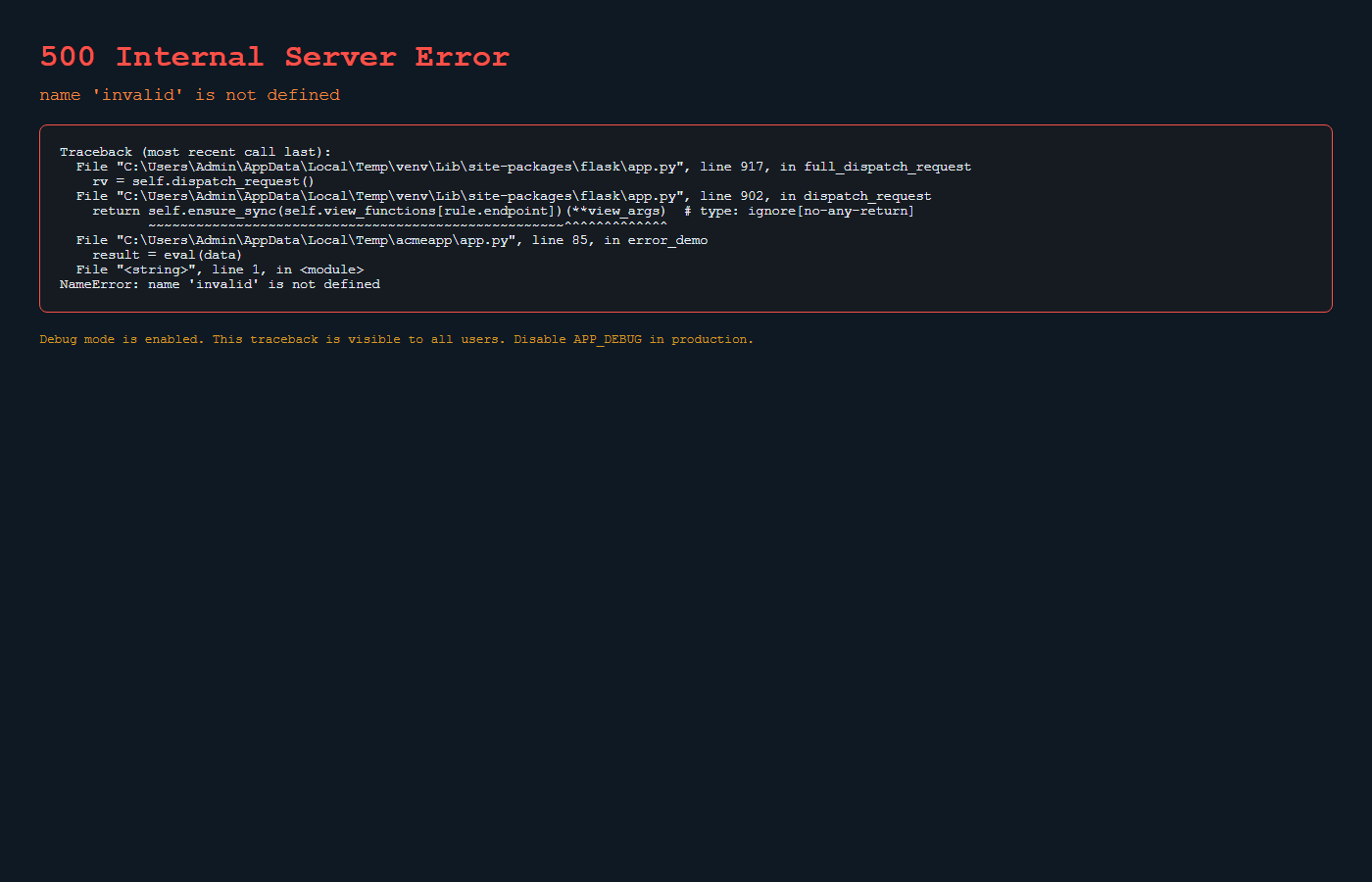
An attacker doesn’t need this to crash the app — they need it to understand the app: which framework, which file structure, which functions handle input.
3. Missing security headers (CWE-1021 / CWE-16: Configuration)
curl -sI http://127.0.0.1:8080/HTTP/1.1 200 OK
Server: nginx/1.27.4
Date: Wed, 07 Oct 2026 16:10:12 GMT
Content-Type: text/html; charset=utf-8
Content-Length: 3655
Connection: keep-aliveNo X-Frame-Options, no Content-Security-Policy, no Strict-Transport-Security — and the Server header happily announces the exact Nginx version, which is free reconnaissance for anyone tracking Nginx CVEs.
4. Default admin console and leaked secrets (CWE-16 / CWE-798: Use of Hard-coded Credentials)
curl -s -o /dev/null -w "%{http_code}\n" http://127.0.0.1:8080/admin
curl -s http://127.0.0.1:8080/admin/config
/admin returns 200 with zero authentication — no login redirect, no session check:
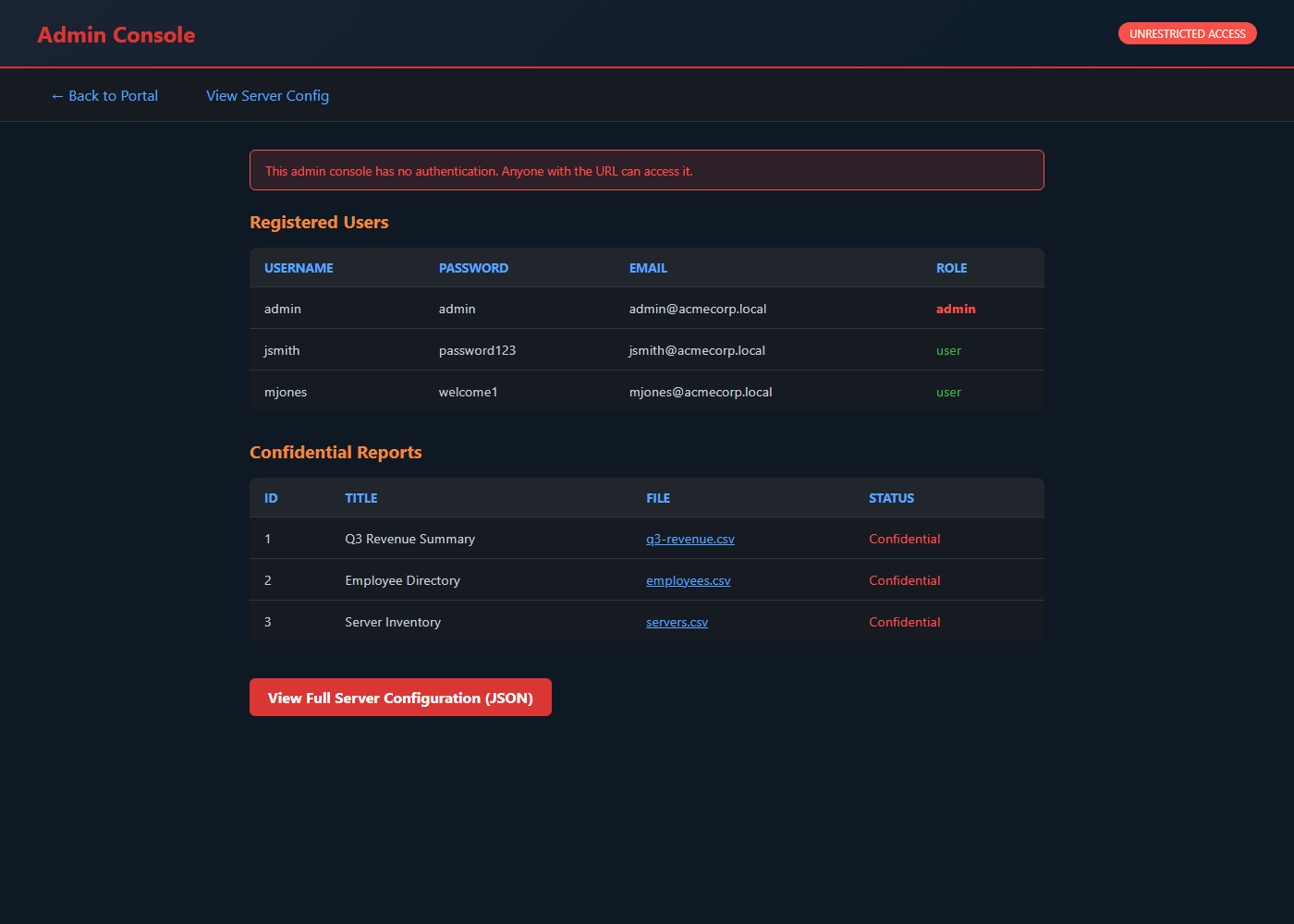
/admin/config is worse: it dumps the Flask secret key, the database connection string, and even a fake internal S3 bucket name and AWS region as plain JSON:
{
  "admin_pass": "admin",
  "admin_user": "admin",
  "aws_region": "us-east-1",
  "database": "sqlite:///acmecorp.db",
  "debug": true,
  "internal_api": "http://10.0.0.5:8080/api/v2",
  "s3_bucket": "acmecorp-internal-backups",
  "secret_key": "supersecretkey123"
}
And the login form accepts admin / admin — a classic default credential left in place from initial setup.
Scanning the stack with curl and nikto
Manual curl checks work, but you want something repeatable for CI. The lab ships scripts/check-misconfigs.sh, which runs all of the checks above automatically:
bash scripts/check-misconfigs.sh http://127.0.0.1:8080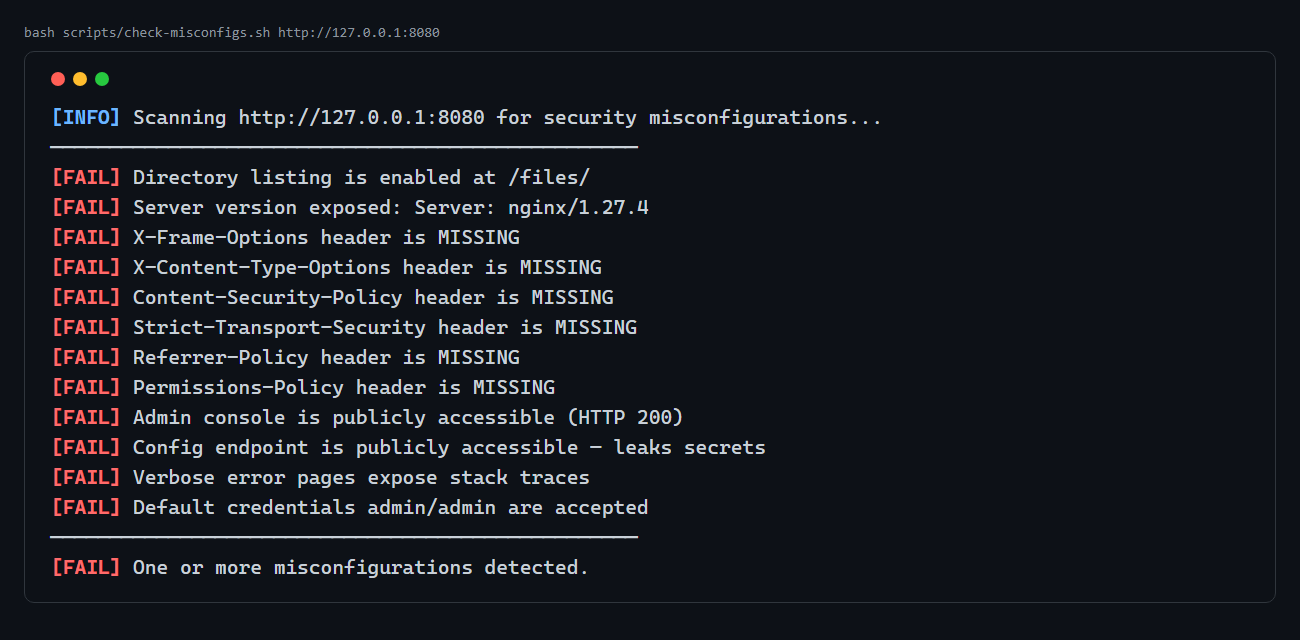
Every single check fails: directory listing, exposed server version, all six security headers, the open admin console, the leaked config endpoint, the verbose error page, and the default credentials.
For broader coverage, point nikto at the same stack. Nikto is a general-purpose web server scanner that checks for thousands of known misconfiguration signatures (outdated server banners, dangerous files, default install paths) in addition to the specific issues above. There’s no single official Nikto image on Docker Hub, so build it straight from the project’s own Dockerfile:
git clone https://github.com/sullo/nikto.git
cd nikto
docker build -t local/nikto .
docker run --rm local/nikto -h http://host.docker.internal:8080
host.docker.internal is the Docker Desktop (Windows/Mac) DNS name for the host machine — use it instead of --network host, which Docker Desktop does not support the way Linux does. Nikto will independently flag the missing X-Frame-Options/X-Content-Type-Options headers and the exposed Server: nginx/1.27.4 banner, confirming what the targeted script already found. Use both: a purpose-built script for the issues you know about, and a generic scanner to catch what you didn’t think to check.
| Finding | CWE | Vulnerable config | Hardened config |
|---|---|---|---|
Directory listing on /files/ |
CWE-548 | autoindex on; |
return 403; |
| Verbose debug errors | CWE-209 | APP_DEBUG=true, proxy_intercept_errors off; |
APP_DEBUG=false, proxy_intercept_errors on; |
| Missing security headers | CWE-1021 | no add_header directives |
6 add_header directives |
| Open admin console | CWE-16 | location /admin { ... } proxied through |
location /admin { return 404; } |
Leaked /admin/config |
CWE-16 | proxied through | return 404; |
| Server version banner | CWE-16 | server_tokens on; |
server_tokens off; |
| Default credentials | CWE-798 | admin / admin accepted |
still accepted (see below) |
Hardening the stack
Switch to the hardened Compose file, which swaps in nginx/hardened/nginx.conf and sets APP_DEBUG=false:
docker compose down
docker compose -f docker-compose.hardened.yml up --build -d
The hardened Nginx config adds the missing headers, disables directory listing, blocks the admin routes outright, hides the server version, and intercepts backend errors instead of passing them through:
server_tokens off;
add_header X-Frame-Options "DENY" always;
add_header X-Content-Type-Options "nosniff" always;
add_header Content-Security-Policy "default-src 'self'; style-src 'self' 'unsafe-inline'" always;
add_header Referrer-Policy "strict-origin-when-cross-origin" always;
add_header Permissions-Policy "camera=(), microphone=(), geolocation=()" always;
add_header Strict-Transport-Security "max-age=31536000; includeSubDomains" always;

location /files/ { return 403; }
location /admin { return 404; }
location /admin/config { return 404; }

error_page 500 502 503 504 /50x.html;
location = /50x.html { root /usr/share/nginx/html; internal; }

location / {
    proxy_pass http://app:5000;
    proxy_intercept_errors on;
}
Re-running the checker shows the difference immediately:
bash scripts/check-misconfigs.sh http://127.0.0.1:8080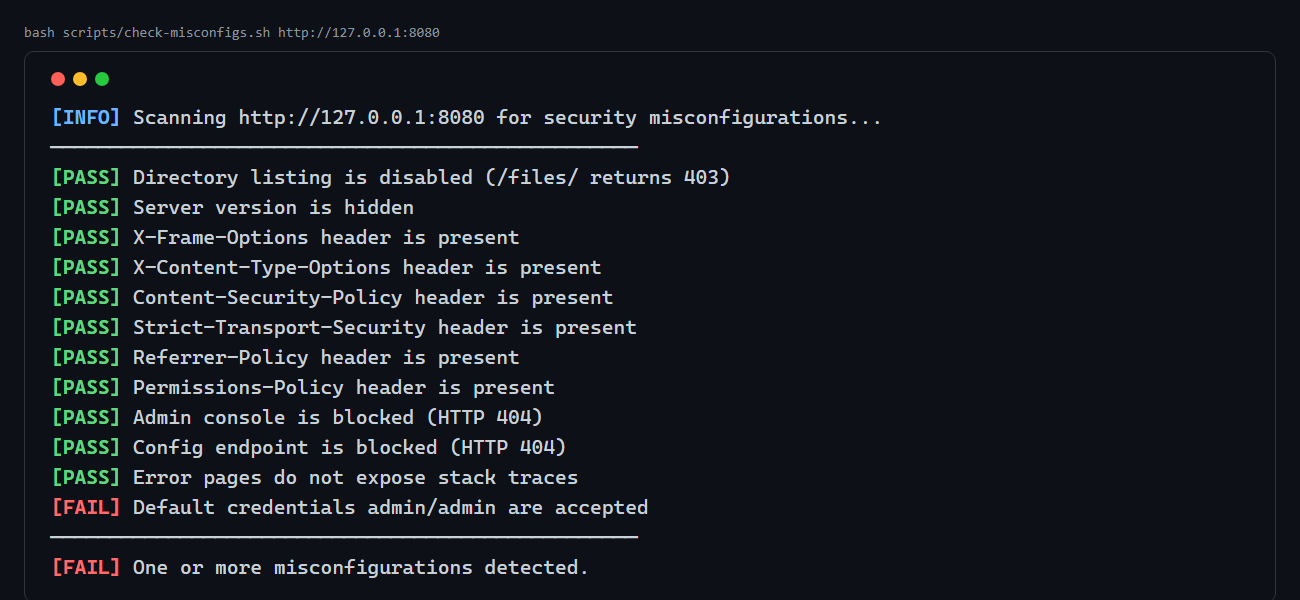
Eleven of twelve checks now pass: directory listing is a 403, the server banner is hidden, all six headers are present, /admin and /admin/config return 404, and /error-demo now returns Nginx’s own generic error page instead of a Flask traceback — proxy_intercept_errors on means Nginx swallows the backend’s 500 response entirely and substitutes its static page, so even an app-level mistake can’t leak detail to the client.
The one check that still fails — and why that matters
The default-credentials check still fails against the "hardened" stack. The hardened Compose file sets ADMIN_USER=secureadmin and a strong ADMIN_PASS, but those environment variables are only used by /admin/config (which is now blocked anyway) — the actual login() route checks a hardcoded USERS_DB dictionary in app.py with admin/admin baked in, completely independent of the environment variables:
USERS_DB = {
    "admin": {"password": "admin", "role": "admin", "email": "[email protected]"},
    "jsmith": {"password": "password123", "role": "user", "email": "[email protected]"},
    "mjones": {"password": "welcome1", "role": "user", "email": "[email protected]"},
}
This is the teaching point: infrastructure hardening at the Nginx layer does not fix credentials hardcoded in application code. You fixed the reverse proxy; you didn’t fix the app. The real remediation is to read credentials from environment variables (or better, a secrets manager) inside app.py itself, hash them, and delete the hardcoded fallback dictionary entirely. Security misconfiguration is rarely one bug — it’s a stack of independent defaults, and each layer has to be hardened on its own terms.
Automating the check so it fails CI
Because check-misconfigs.sh exits non-zero on any failure, you can drop it straight into a pipeline step:
# .github/workflows/misconfig-check.yml
jobs:
  misconfig-scan:
    runs-on: ubuntu-latest
    steps:
      - uses: actions/checkout@v4
      - name: Start the stack
        run: docker compose -f docker-compose.hardened.yml up --build -d
      - name: Wait for app
        run: sleep 5
      - name: Run misconfiguration checks
        run: bash scripts/check-misconfigs.sh http://127.0.0.1:8080
A failing exit code blocks the merge. That turns "remember to check the headers before shipping" into something that happens automatically on every pull request, which is the only way this class of bug stays fixed.
Lab: download and run it
What’s inside:
default-creds-to-open-buckets/
├── app/                         # Flask app: login, /admin, /admin/config, /error-demo
├── nginx/vulnerable/nginx.conf  # misconfigured Nginx
├── nginx/hardened/nginx.conf    # hardened Nginx
├── scripts/check-misconfigs.sh  # automated curl-based checker
├── docker-compose.yml           # vulnerable stack
├── docker-compose.hardened.yml  # hardened stack
├── run.sh / run.ps1              # quick-start scripts
└── README.md
Run it:
unzip default-creds-to-open-buckets-lab.zip
cd default-creds-to-open-buckets

# 1. Start the vulnerable stack
docker compose up --build -d

# 2. Explore — directory listing, admin console, leaked config, debug errors
curl -s http://127.0.0.1:8080/files/
curl -s -o /dev/null -w "%{http_code}\n" http://127.0.0.1:8080/admin

# 3. Run the automated checker — expect 12 FAILs
bash scripts/check-misconfigs.sh http://127.0.0.1:8080

# 4. Switch to the hardened stack
docker compose down
docker compose -f docker-compose.hardened.yml up --build -d

# 5. Re-run the checker — expect 11 PASS, 1 FAIL (default creds, see above)
bash scripts/check-misconfigs.sh http://127.0.0.1:8080
To stop and clean up:
docker compose down            # or: docker compose -f docker-compose.hardened.yml down
docker rmi default-creds-to-open-buckets-app 2>/dev/null || true
Everything binds to 127.0.0.1 only and uses placeholder data — safe to run on your own machine, never expose it to a network.
Key takeaways
- Security Misconfiguration is OWASP’s #2 risk for 2025 (16 CWEs, 100% of tested apps affected, 719,084 occurrences) precisely because it requires no custom exploit — a browser and
curlare enough. - Directory listing, verbose errors, missing headers, and open admin consoles are all "off by default" in theory but reappear constantly through debug flags left on and configs copy-pasted without review.
- Pair a targeted checker (
check-misconfigs.sh) with a general scanner (nikto) — one catches what you specifically tested for, the other catches what you didn’t think of. - Hardening the reverse proxy (headers, blocked routes, generic errors) is necessary but not sufficient — this lab’s own hardened config still leaves default credentials working because they’re hardcoded in the app layer, not controlled by the proxy.
- Wire the checker into CI so a reintroduced misconfiguration fails the build instead of reaching production.
References
- OWASP Top 10:2025 — A02:2025 Security Misconfiguration
- Nginx —
add_headerdirective documentation - Nikto web server scanner