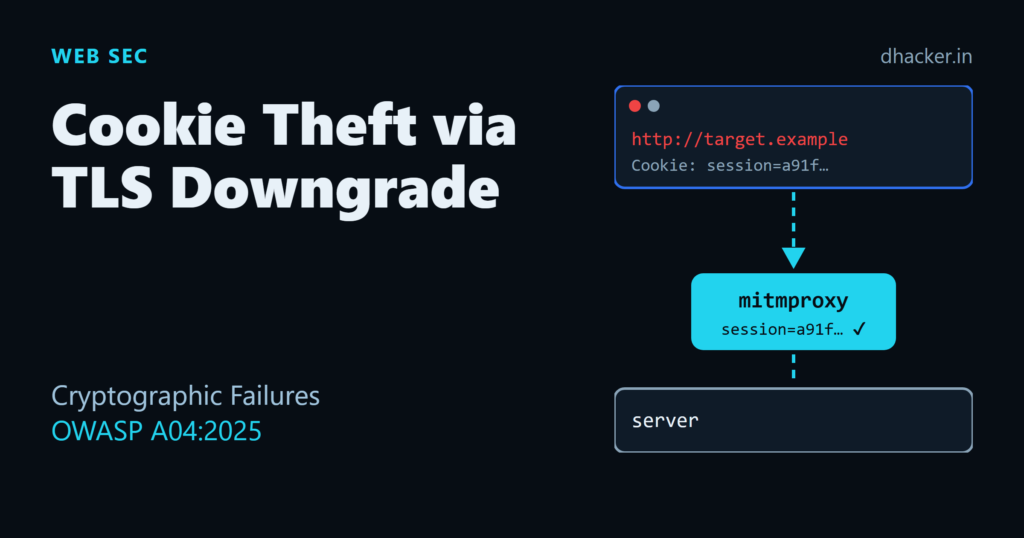
A session cookie sent over plain HTTP is not a hypothetical weakness — it’s a live credential, readable by anyone who can see the traffic. That includes an attacker on the same Wi-Fi, a compromised router, or a connection that got silently downgraded from HTTPS to HTTP. In this lab you’ll run mitmproxy as that attacker, watch a session cookie fall out of a plaintext login, then fix the whole chain: HTTPS with a real certificate, the Secure/HttpOnly/SameSite cookie flags, and Argon2id instead of a fast, unsalted password hash. By the end you’ll have a before/after Flask app and a repeatable way to show why each fix matters, not just that it exists.
This maps to A04:2025 — Cryptographic Failures in the OWASP Top 10, the category covering missing or weak encryption, insecure key handling, and weak password storage.
A quick note on where this sits in the 2025 list
The OWASP Top 10:2025 page for A04 lists Cryptographic Failures at position #4, and its own text describes the category as "moving down two positions to #4" — which is a little confusing, since Cryptographic Failures was published at #2 in the 2021 list, and some internal OWASP data-call material references a #6 position for this category in other contexts. In short: the source page is inconsistent about the exact rank; treat the ranking number as approximate. What matters for this article is the category itself and its scope, not the exact ordinal.
The stats OWASP publishes for A04:2025 are not in question, though — they come straight from the category page:
| Metric | Value |
|---|---|
| CWEs mapped | 32 |
| Max incidence rate | 13.77% |
| Average incidence rate | 3.80% |
| Total occurrences | 1,665,348 |
| CVEs | 2,185 |
Source: top10.owasp.org/2025/A04_2025-Cryptographic_Failures
What "cryptographic failure" actually means here
It’s broader than "forgot to use HTTPS." A04:2025 covers:
- Transmitting sensitive data (credentials, session tokens, PII) in cleartext, including over HTTP, or over TLS that’s misconfigured or easily downgraded.
- Using weak, outdated, or home-grown cryptographic algorithms (MD5/SHA-1 for passwords, ECB mode, short keys).
- Storing passwords with fast, non-adaptive hashes instead of a purpose-built algorithm like Argon2, bcrypt, or scrypt.
- Poor key management: hardcoded keys, keys committed to source control, no rotation.
- Missing forward secrecy, so a single leaked key can retroactively decrypt recorded traffic.
The scenario in this lab — a stolen session cookie — is OWASP’s own example attack for this category: an attacker downgrades or intercepts a connection, captures a cookie sent in cleartext, and replays it to impersonate the victim without ever touching a password.
Lab setup
The lab has two versions of a tiny Flask "bank" app:
vulnerable_app.py— plain HTTP on port 5000, sets a cookie with noSecure/HttpOnly/SameSiteflags, hashes passwords with unsalted MD5.fixed_app.py— HTTPS on port 5443 with a self-signed cert, cookie flags set correctly, passwords hashed with Argon2id.
Both sit in front of mitmproxy, acting as the network path an attacker controls after a downgrade or a rogue access point.
pip install flask mitmproxy argon2-cffi cryptographyStep 1: capture a cookie sent over plaintext HTTP
Start the vulnerable app:
python vulnerable_app.py
# Vulnerable app: plain HTTP on http://127.0.0.1:5000  (login alice/hunter2)
In a second terminal, start mitmdump (mitmproxy’s non-interactive CLI) with a small addon that prints any Cookie or Set-Cookie header it sees:
mitmdump -s sniff_cookies.py -p 8080sniff_cookies.py is a few lines of mitmproxy’s addon API:
from mitmproxy import http

def response(flow: http.HTTPFlow) -> None:
    set_cookie = flow.response.headers.get("Set-Cookie")
    if set_cookie:
        print(f"[CAPTURED] {flow.request.pretty_host}{flow.request.path} -> Set-Cookie: {set_cookie}")

def request(flow: http.HTTPFlow) -> None:
    cookie = flow.request.headers.get("Cookie")
    if cookie:
        print(f"[CAPTURED] {flow.request.pretty_host}{flow.request.path} -> Cookie: {cookie}")
Now route a login through the proxy, the way traffic would flow if it had been forced onto an attacker-controlled path:
curl --proxy 127.0.0.1:8080 -c cookies.txt \
  -d "username=alice&password=hunter2" http://127.0.0.1:5000/login
curl --proxy 127.0.0.1:8080 -b cookies.txt http://127.0.0.1:5000/account
The mitmproxy terminal shows the session cookie in cleartext, both when it’s issued and when it’s replayed:
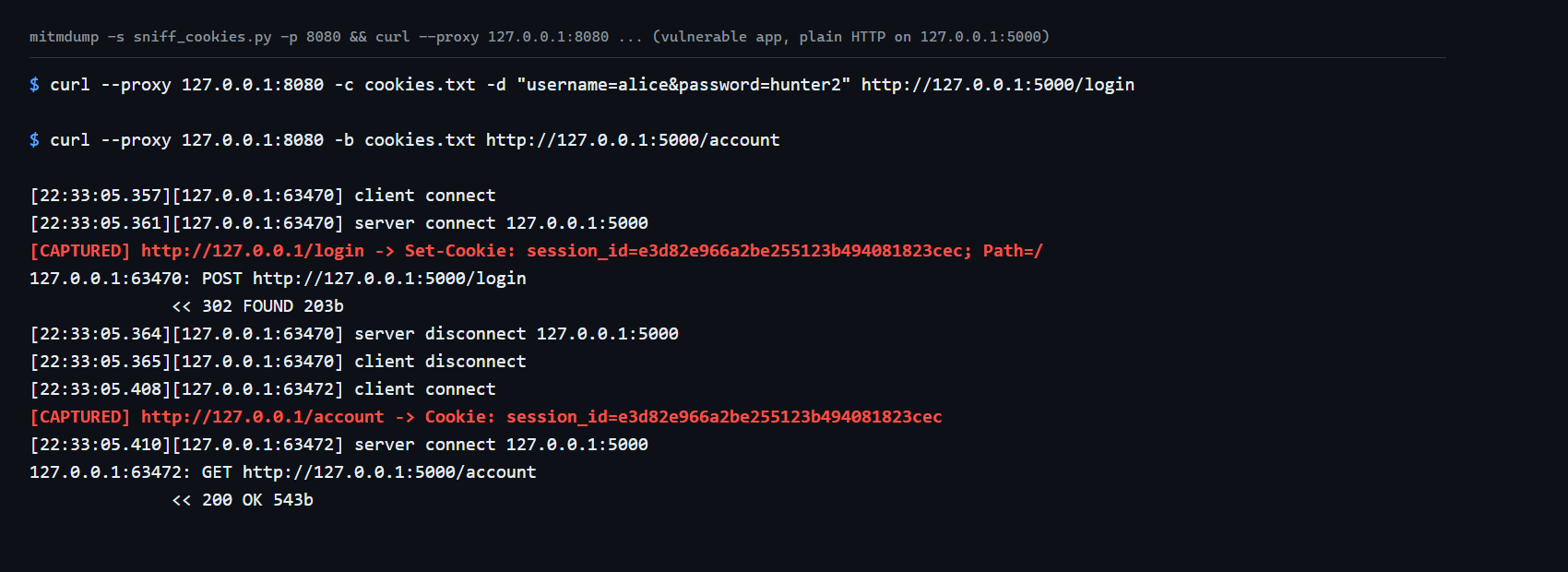
That session_id value is everything an attacker needs — set it as a cookie in their own browser and they’re logged in as alice, no password required. This is exactly what "cookie theft via TLS downgrade" looks like on the wire: the application-layer logic was fine, but the transport carried a live credential in the open.
Step 2: fix it — HTTPS, cookie flags, and a real certificate
Generate a local self-signed certificate (for 127.0.0.1 only — never do this for a real deployment; use a CA-issued cert, e.g. via Let’s Encrypt):
python make_cert.py
# Wrote cert.pem and key.pem (self-signed, CN=127.0.0.1, valid 365 days)
fixed_app.py serves HTTPS and sets the cookie with all three protective flags:
resp.set_cookie(
    "session_id",
    session_id,
    secure=True,     # never sent over plain HTTP
    httponly=True,   # not readable from JavaScript (blocks cookie theft via XSS)
    samesite="Lax",  # not sent on most cross-site requests (blocks CSRF-style replay)
)
app.run(host="127.0.0.1", port=5443, ssl_context=("cert.pem", "key.pem"))
Start it and try the same proxy capture again:
python fixed_app.py
curl --proxy 127.0.0.1:8080 -d "username=alice&password=hunter2" https://127.0.0.1:5443/login
This time it fails — mitmproxy can intercept the TCP connection, but to read the HTTPS content it would need to present a certificate your client trusts, and it can’t forge a valid one for 127.0.0.1 signed by the self-signed app’s own CA:
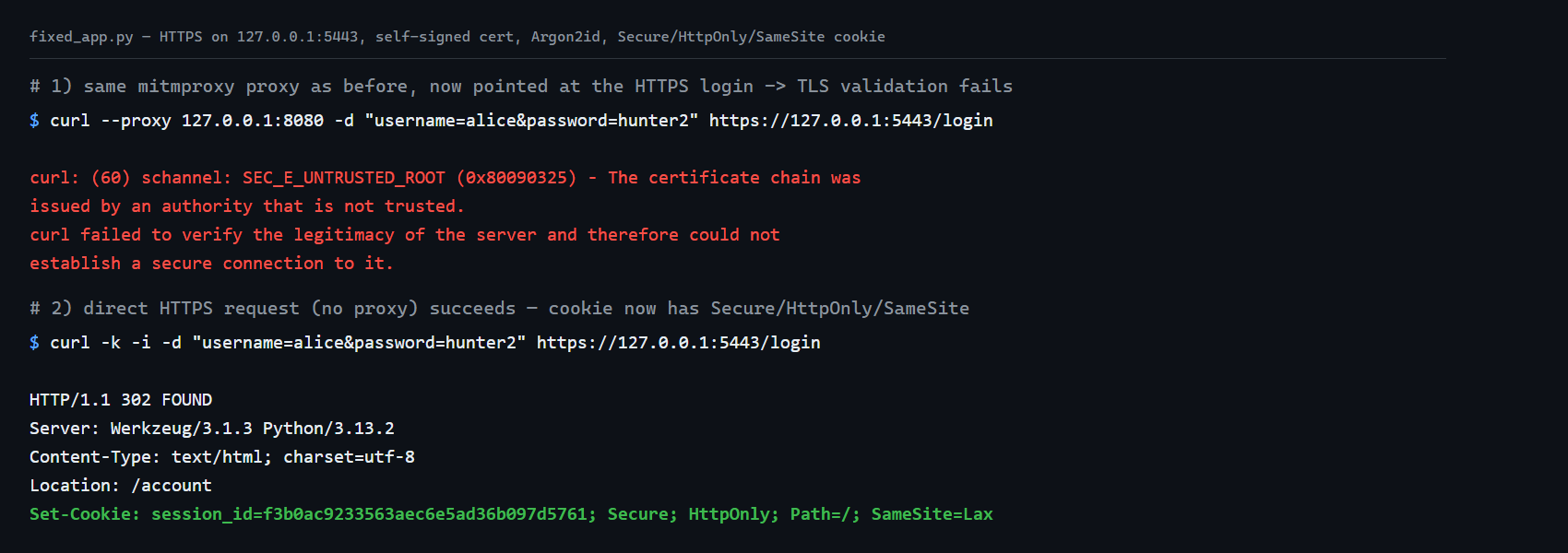
Logging in directly (no proxy) succeeds, and the Set-Cookie header now carries Secure; HttpOnly; Path=/; SameSite=Lax. Three fixes, three distinct protections:
| Flag | Stops |
|---|---|
Secure |
Cookie being sent over any non-HTTPS connection, including a downgraded one |
HttpOnly |
Cookie being read by injected/XSS JavaScript |
SameSite=Lax |
Cookie being attached to most cross-site requests (CSRF-style replay) |
One honest caveat worth teaching: this demo "succeeds" at blocking mitmproxy only because curl correctly rejects an untrusted certificate. If a user clicks through a browser’s certificate warning, or an attacker gets a rogue CA installed on the device, TLS alone won’t save them — which is exactly why HSTS (Strict-Transport-Security), certificate pinning for high-value clients, and user education against "click through the warning" habits all matter as defense in depth.
Step 3: why Argon2id instead of MD5 or SHA-256
The vulnerable app stores passwords as hashlib.md5(password).hexdigest() — fast, unsalted, and trivial to brute-force or precompute (rainbow tables) once the hash database leaks. MD5 and SHA-256 were designed to be fast, which is exactly the wrong property for password storage: speed is what lets an attacker test billions of guesses per second on commodity hardware.
Argon2id (the OWASP-recommended default) is deliberately slow and memory-hard, with tunable cost parameters. The lab includes a benchmark that measures real throughput on your own machine instead of citing a number from somewhere else:
python hash_comparison.py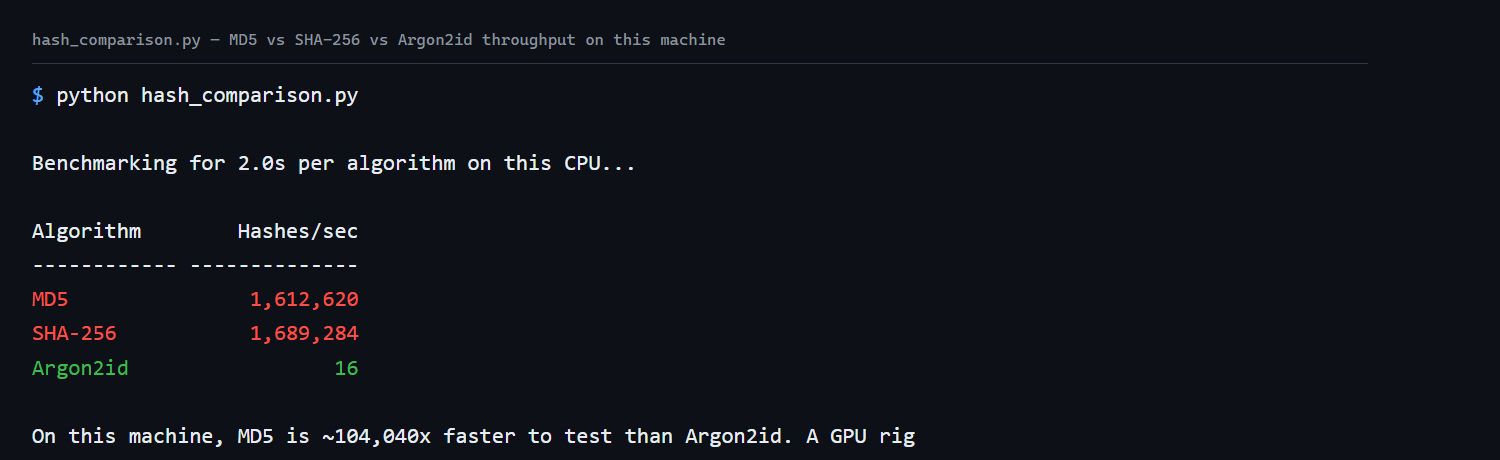
On this machine, MD5 and SHA-256 ran around 1.6 million hashes per second; Argon2id (default cost parameters: ~64 MB memory, 3 iterations) managed about 16. That’s roughly a 100,000x gap. Against a leaked hash database, MD5 turns a brute-force attack into a weekend GPU job; Argon2id with real cost parameters turns the same budget into a non-starter. This is throughput, not an actual password crack — but throughput is precisely the number that determines how fast an offline attacker can work through a hash database once it leaks.
from argon2 import PasswordHasher
ph = PasswordHasher()
stored_hash = ph.hash("hunter2")   # salted + adaptive automatically
ph.verify(stored_hash, "hunter2") # raises VerifyMismatchError on wrong passwordargon2-cffi‘s PasswordHasher handles salting and parameter storage for you — the hash string itself encodes the algorithm variant and cost parameters, so you can tune them later without breaking verification of older hashes.
Forward secrecy and the post-quantum horizon
Two things worth knowing even if they don’t show up in this lab’s output:
- Forward secrecy means each TLS session uses an ephemeral key, so recording encrypted traffic today and later stealing the server’s long-term private key still doesn’t let an attacker decrypt the recording. Modern TLS 1.3 defaults to ephemeral (EC)DHE key exchange, so this is mostly "don’t force TLS 1.2 with static RSA key exchange" rather than something you configure by hand.
- Post-quantum readiness: OWASP’s A04 guidance flags 2030 as a planning horizon for migrating sensitive long-lived data to post-quantum-resistant algorithms, since a sufficiently capable quantum computer could retroactively break classical public-key crypto. This isn’t an urgent code change today, but it’s worth tracking for any system handling data that must stay confidential for years (e.g. medical records, long-term credentials).
Detection and broader mitigation
Beyond the three fixes in this lab:
- Classify data before deciding what needs encryption at rest and in transit — not everything does, but anything sensitive (credentials, tokens, PII, payment data) does.
- Use vetted libraries, not home-grown crypto.
argon2-cffi, Python’scryptographypackage, and your framework’s built-in session handling exist so you don’t reinvent key management. - Enforce TLS 1.2+ everywhere, disable legacy protocol versions and weak cipher suites at the load balancer or reverse proxy, and set
Strict-Transport-Securityso browsers refuse to downgrade even if a user typeshttp://. - Rotate and never hardcode keys. Secrets belong in a vault or environment-specific secret store, not in source control.
- Monitor for downgrade attempts: logging TLS version and cipher suite per connection, and alerting on an unexpected spike in plain-HTTP requests to an HTTPS-only service, catches this class of attack in production.
Key takeaways
- A04:2025 Cryptographic Failures covers missing/weak encryption in transit and at rest, weak password hashing, and poor key management — the OWASP page cites 32 CWEs, a 13.77% max incidence rate, 1,665,348 occurrences, and 2,185 CVEs. The exact rank number on the page is inconsistent (#4 shown, "#6→#4" phrasing, 2021 published rank was #2) — treat it as approximate, not exact.
- A session cookie sent over plain HTTP is a bearer credential visible to anyone on the network path —
mitmproxydemonstrated this by printing it straight from the wire. Secure,HttpOnly, andSameSiteeach block a distinct theft/replay vector; use all three, and don’t treat HTTPS alone as sufficient without them.- Fast hashes (MD5, SHA-256) are the wrong tool for password storage precisely because they’re fast — Argon2id’s deliberate slowness and memory-hardness is the point.
- HTTPS protects against passive interception, but a client that trusts a rogue CA (or clicks through a warning) defeats it — HSTS and user training are defense in depth, not optional extras.
Lab: download and run it
What’s inside:
cookie-theft-tls-downgrade/
├── vulnerable_app.py    # plain HTTP, no cookie flags, MD5 passwords
├── fixed_app.py         # HTTPS, Secure/HttpOnly/SameSite cookie, Argon2id
├── make_cert.py         # generates a local self-signed cert for fixed_app.py
├── sniff_cookies.py     # mitmproxy addon that prints captured cookies
├── hash_comparison.py   # MD5 vs SHA-256 vs Argon2id throughput benchmark
├── run.sh / run.ps1     # runs the whole demo end to end
├── requirements.txt
└── README.md
Run it:
unzip cookie-theft-tls-downgrade-lab.zip
cd cookie-theft-tls-downgrade
chmod +x run.sh
./run.sh
On Windows, use run.ps1 in PowerShell instead. Both scripts install dependencies, start the vulnerable app and mitmdump, show the captured plaintext cookie, then switch to the fixed HTTPS app, show the capture attempt failing, show the properly-flagged cookie, and finish with the Argon2 benchmark — all automatically, with no manual terminal juggling required. Everything binds to 127.0.0.1; stop the script with Ctrl+C or let it finish, and it cleans up its own background processes. See the README inside the zip for the manual (three-terminal) walkthrough if you’d rather drive each step yourself, plus cleanup notes.
References
- OWASP Top 10:2025 — A04:2025 Cryptographic Failures
- OWASP Top 10:2025 — full list
- mitmproxy documentation
- argon2-cffi documentation
- MDN — Set-Cookie: Secure, HttpOnly, SameSite