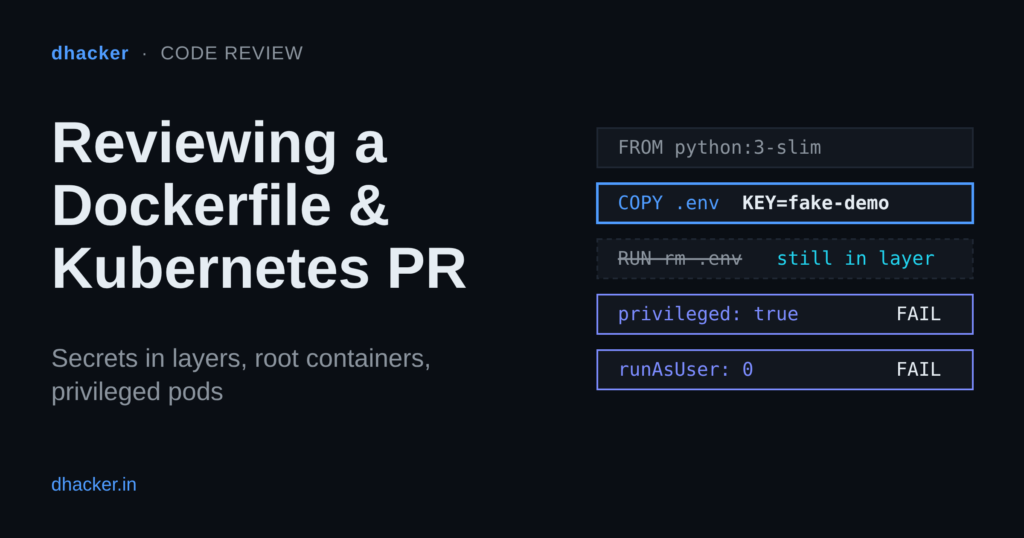
The pull request says: "Image builds, pods start, tests pass. Cleaned up the secrets after the build. Needs host access, so I made it privileged." Every claim can be true and the PR can still hand an attacker your API key and your node. In this post you review that PR: you find a key that a later RUN rm did not remove, see which securityContext fields decide how far a compromised container can reach, and watch Pod Security Standards turn review opinions into pass/fail rules. You do it in a small browser console backed by a local Docker lab, with the terminal route next to every step.
This is an authorized, local-only lab: everything runs on 127.0.0.1, the only secret is the fake fake-demo-key-123, and nothing in it is privileged.
What goes wrong in a "it works" container PR
Why a deleted secret is still in the image
A Dockerfile instruction that changes the filesystem creates a layer, and an image is a stack of those layers. A later RUN rm does not edit the earlier layer. It adds a new layer that marks the file as deleted. The running container looks clean, but the layer that holds the file is still part of the image and anyone who pulls it can read it.
Build arguments and environment variables are worse. Docker’s documentation says they are inappropriate for passing secrets because they persist in the final image, and the Dockerfile reference adds that build arguments are visible in docker history. The supported way is a secret mount: the secret is exposed to one build step as a file, by default at /run/secrets/<id>, and is never written to a layer.
Which fields change the blast radius
The useful question is what each field lets a compromised process do. These are the fields to read, with the Pod Security Standards (PSS) profile that covers them:
| Field | What it changes | PSS profile |
|---|---|---|
privileged: true |
Removes most container isolation | Baseline |
hostNetwork, hostPID, hostIPC |
Shares the node’s namespaces | Baseline |
hostPath volume |
Mounts a node directory into the pod | Baseline |
allowPrivilegeEscalation |
Must be false (blocks setuid-style escalation) |
Restricted |
runAsNonRoot, runAsUser |
Must run as non-root, UID not 0 | Restricted |
capabilities.drop |
Must include ALL; only NET_BIND_SERVICE may be added back |
Restricted |
seccompProfile.type |
Must be RuntimeDefault or Localhost |
Restricted |
How PSS and PSA turn opinions into rules
The Pod Security Standards define three cumulative profiles: Privileged (unrestricted), Baseline (prevents known privilege escalations) and Restricted (current hardening best practice). Pod Security Admission (PSA) enforces them per namespace through labels such as pod-security.kubernetes.io/enforce: restricted. It has three modes:
enforce: violating pods are rejected.audit: allowed, but an audit annotation is recorded.warn: allowed, but the user sees a warning.
One detail matters for review: the docs say audit and warn apply to workload resources such as Deployments, but enforce applies only to the resulting Pods. A bad Deployment is accepted and its pods are refused. PodSecurityPolicy was removed in Kubernetes v1.25; PSA is the built-in alternative.
PSS is not a full review. It does not ask for image digests, resource limits, a read-only root filesystem or non-plaintext secrets. You still check those yourself.
The PR under review
The Dockerfile:
FROM python:slim
ARG API_KEY=fake-demo-key-123
ENV APP_ENV=production
WORKDIR /app
COPY . .
RUN echo "API_KEY=${API_KEY}" > /app/.build-token
RUN python fetch_vendor_data.py /app/.build-token
# clean up the secrets before shipping
RUN rm -f /app/.env /app/.build-token
EXPOSE 8080
CMD ["python", "app.py"]
And the part of k8s/deployment.yaml that matters:
spec:
  template:
    spec:
      hostNetwork: true
      containers:
        - name: api
          image: registry.example/payments-api:latest
          ports:
            - containerPort: 8080
              hostPort: 8080
          env:
            - name: API_KEY
              value: fake-demo-key-123
          securityContext:
            privileged: true
      volumes:
        - name: host-run
          hostPath:
            path: /var/run
Lab setup: the PR review console
The lab builds two images and runs a console at http://127.0.0.1:8090/ with four tabs: The PR, Mission 1 · Image layers, Mission 2 · Policy check and Mission 3 · Compare. Two demo APIs on 127.0.0.1:8081 (vulnerable) and 127.0.0.1:8082 (fixed) show who each container runs as. The console reads layer data exported by tools/inspect_image.py from docker history and docker save; it never touches the Docker socket.
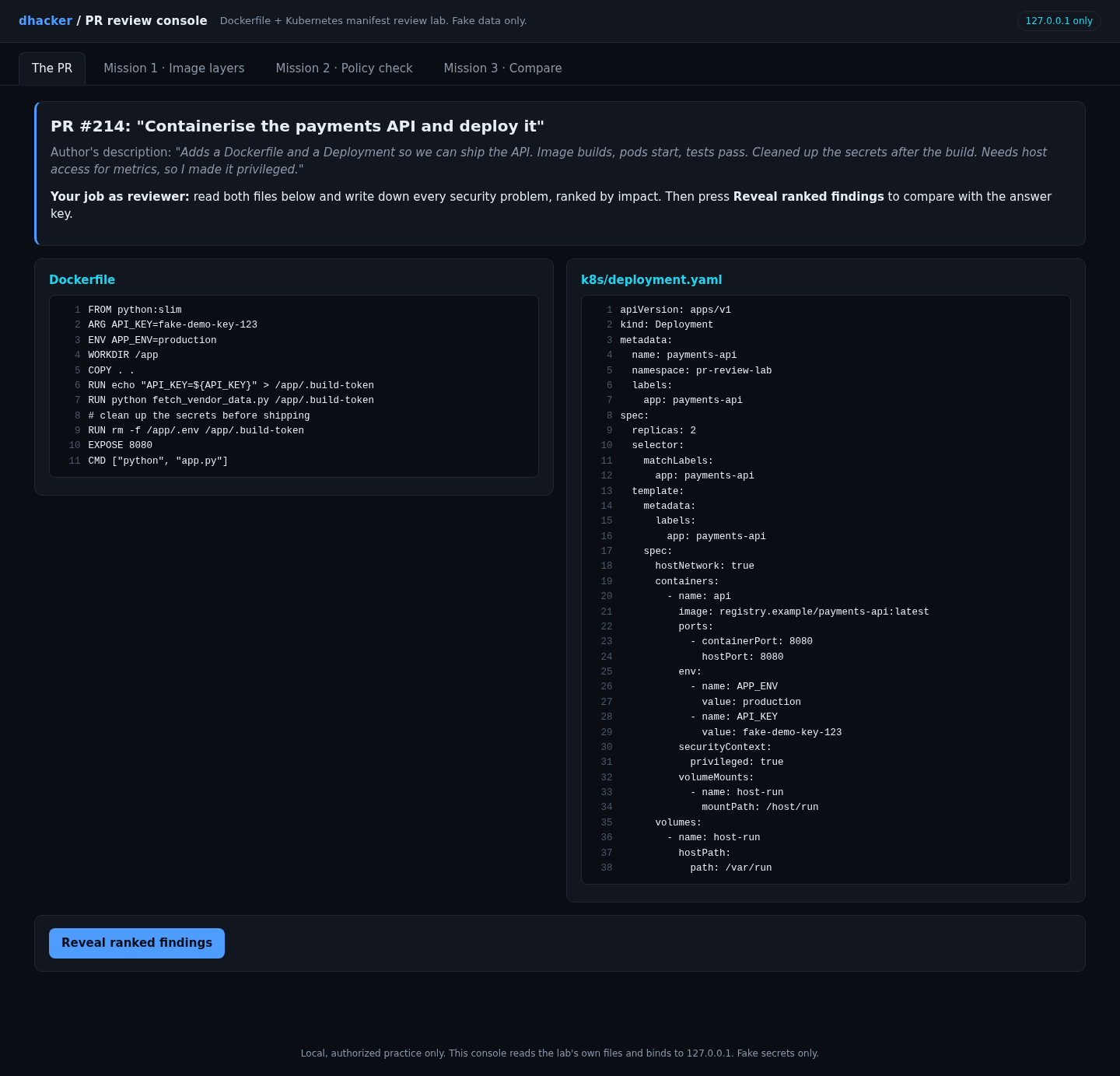
Open The PR, write down every problem you see, ranked by impact, then press Reveal ranked findings.
Show solution
Solution: ten findings, ranked
- Critical: the key is baked into layers (
ARG,COPY . .copying.env, a.build-tokenfile) and intodocker history. Rotate it. - Critical:
privileged: true. - High:
hostPath: /var/run. - High:
hostNetwork: trueandhostPort. - High: no
USER, norunAsNonRoot: the container runs as root. - High: the key is a plain
envvalue in git. - Medium: no
allowPrivilegeEscalation: false, nodrop: [ALL], noseccompProfile. - Medium: floating tags (
python:slim,:latest). - Medium:
COPY . .with no.dockerignore. - Low: no limits, writable root filesystem, service-account token mounted, namespace without PSA labels.
Exploiting it: three missions
Mission 1: find the key that "was deleted"
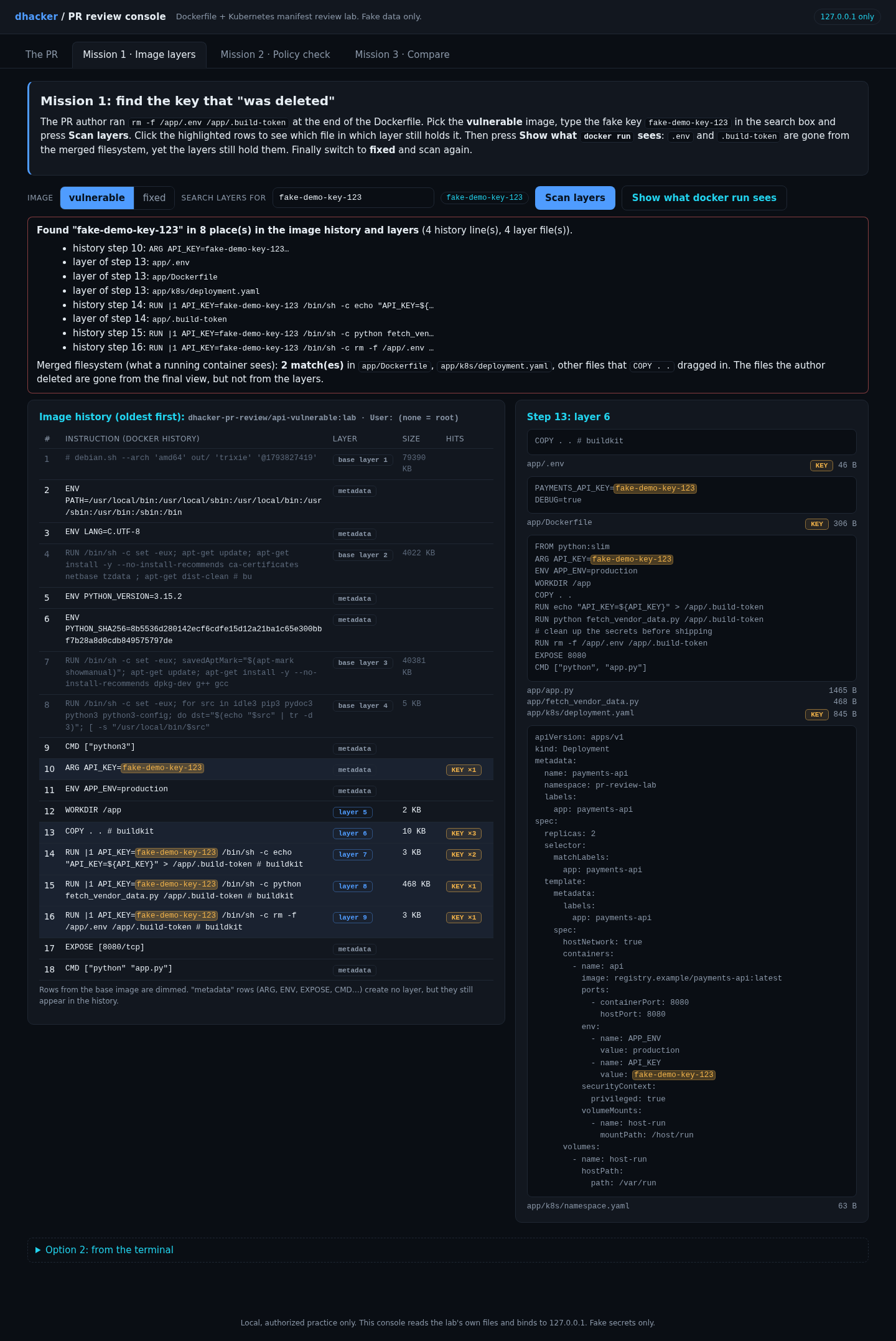
On the Mission 1 tab keep vulnerable selected, type fake-demo-key-123 in the search box (or click the chip) and press Scan layers. Click the highlighted rows. Which layers hold the key, and which row deletes it? Then press Show what docker run sees.
Option 2: from the terminal
docker history --no-trunc dhacker-pr-review/api-vulnerable:lab | grep fake-demo-key-123
docker save dhacker-pr-review/api-vulnerable:lab -o vuln.tar
mkdir vuln && tar -xf vuln.tar -C vuln && cd vuln
for l in blobs/sha256/*; do tar -xOf "$l" 2>/dev/null | grep -aq fake-demo-key-123 && echo "key in $l"; done
docker run --rm dhacker-pr-review/api-vulnerable:lab cat /app/.env
Show solution
Solution: Mission 1
The scan finds 8 places: 4 lines of image history (the ARG and the three RUN |1 API_KEY=... steps, because ARG values are recorded in history) and 4 files inside layers (app/.env, app/.build-token, plus app/Dockerfile and app/k8s/deployment.yaml, which COPY . . also swept in). The last RUN rm layer contains only deletion markers (app/.wh..env, app/.wh..build-token).
In the terminal, docker run ... cat /app/.env answers No such file or directory, yet the for loop prints key in blobs/sha256/... for two layers, and tar -xOf <layer> app/.env prints PAYMENTS_API_KEY=fake-demo-key-123.
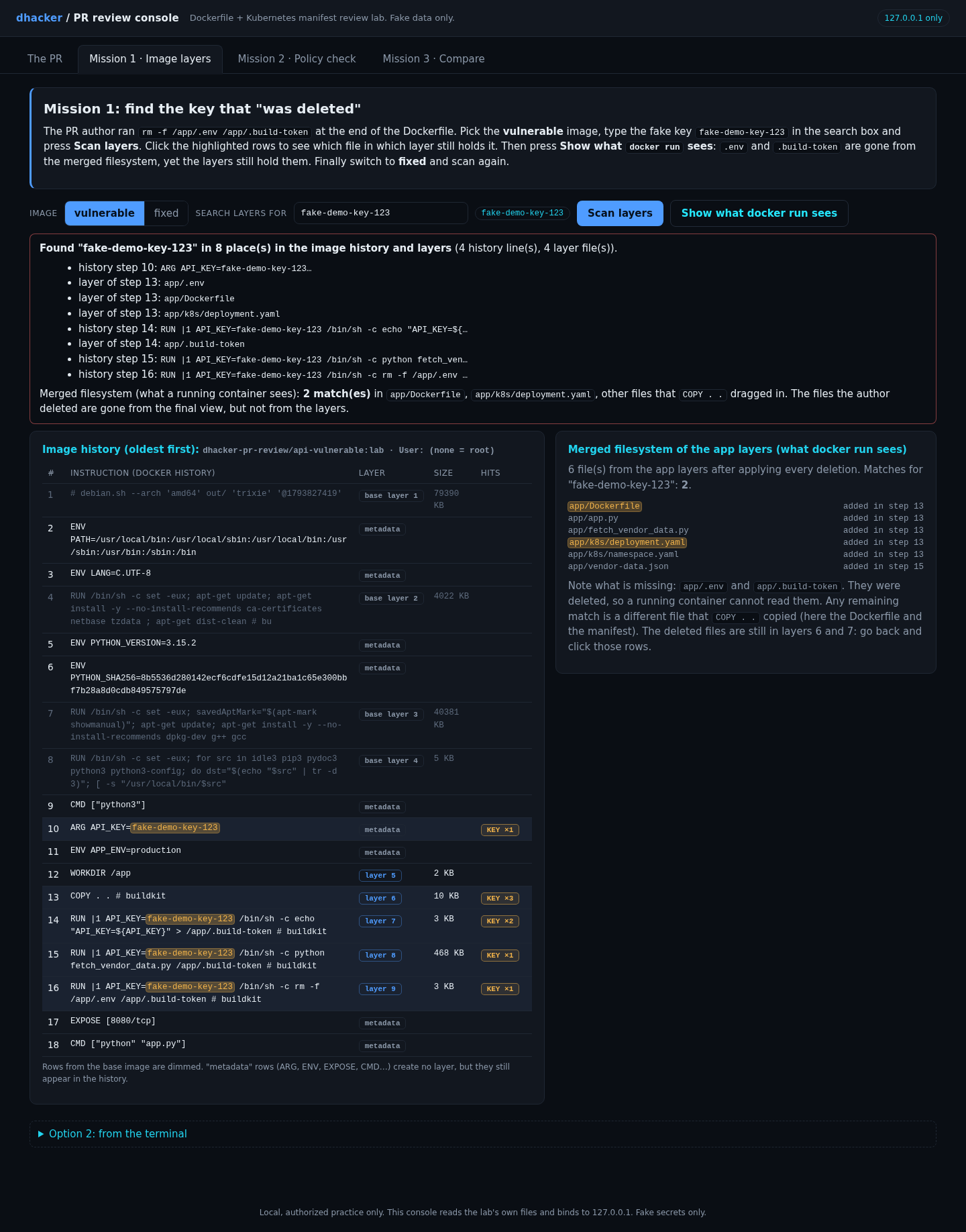
In the merged view .env and .build-token are gone, but the Dockerfile and manifest that the same COPY . . copied still contain the key.
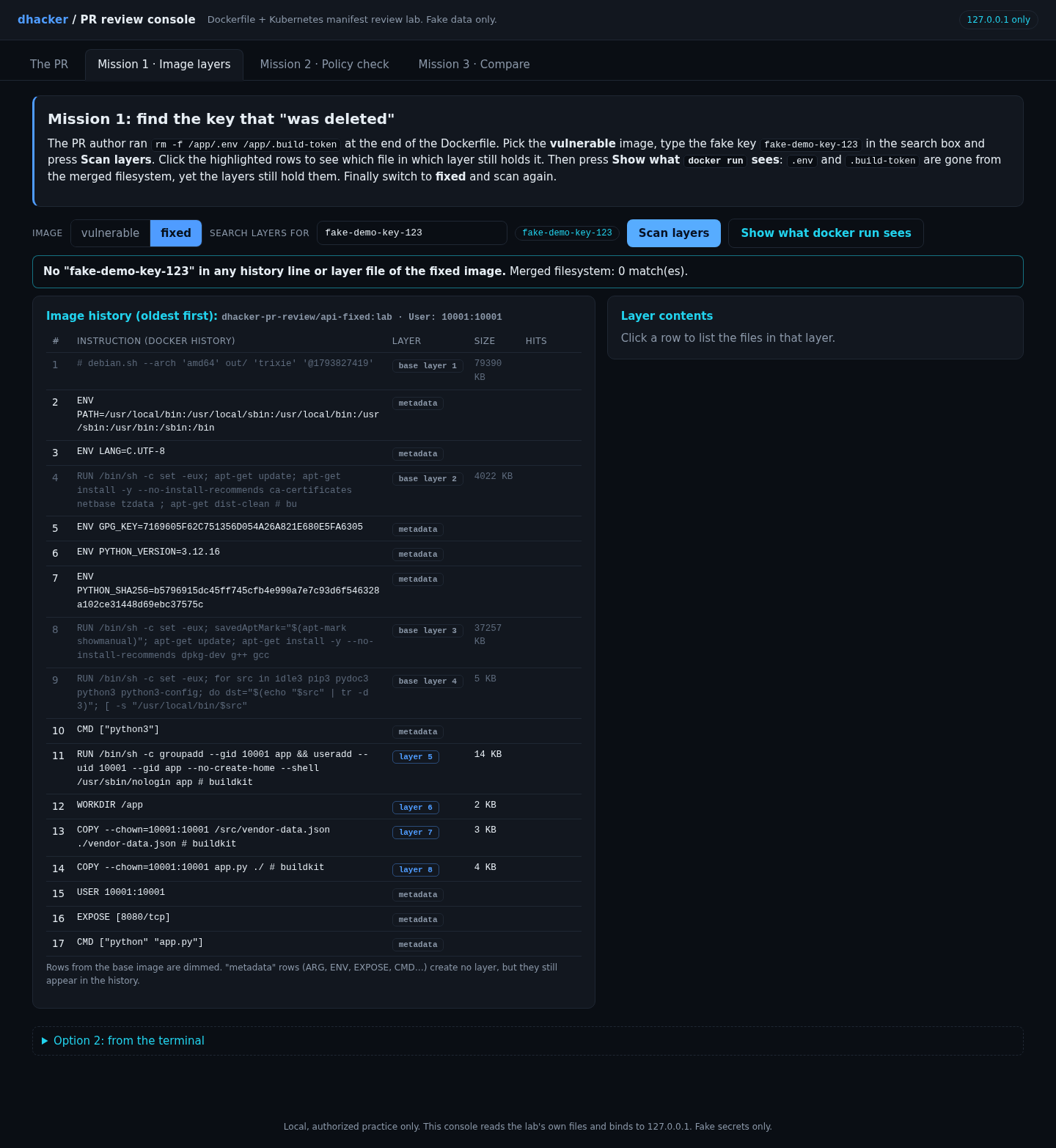
Now switch to fixed and scan again.
Mission 2: let the policy do the arguing
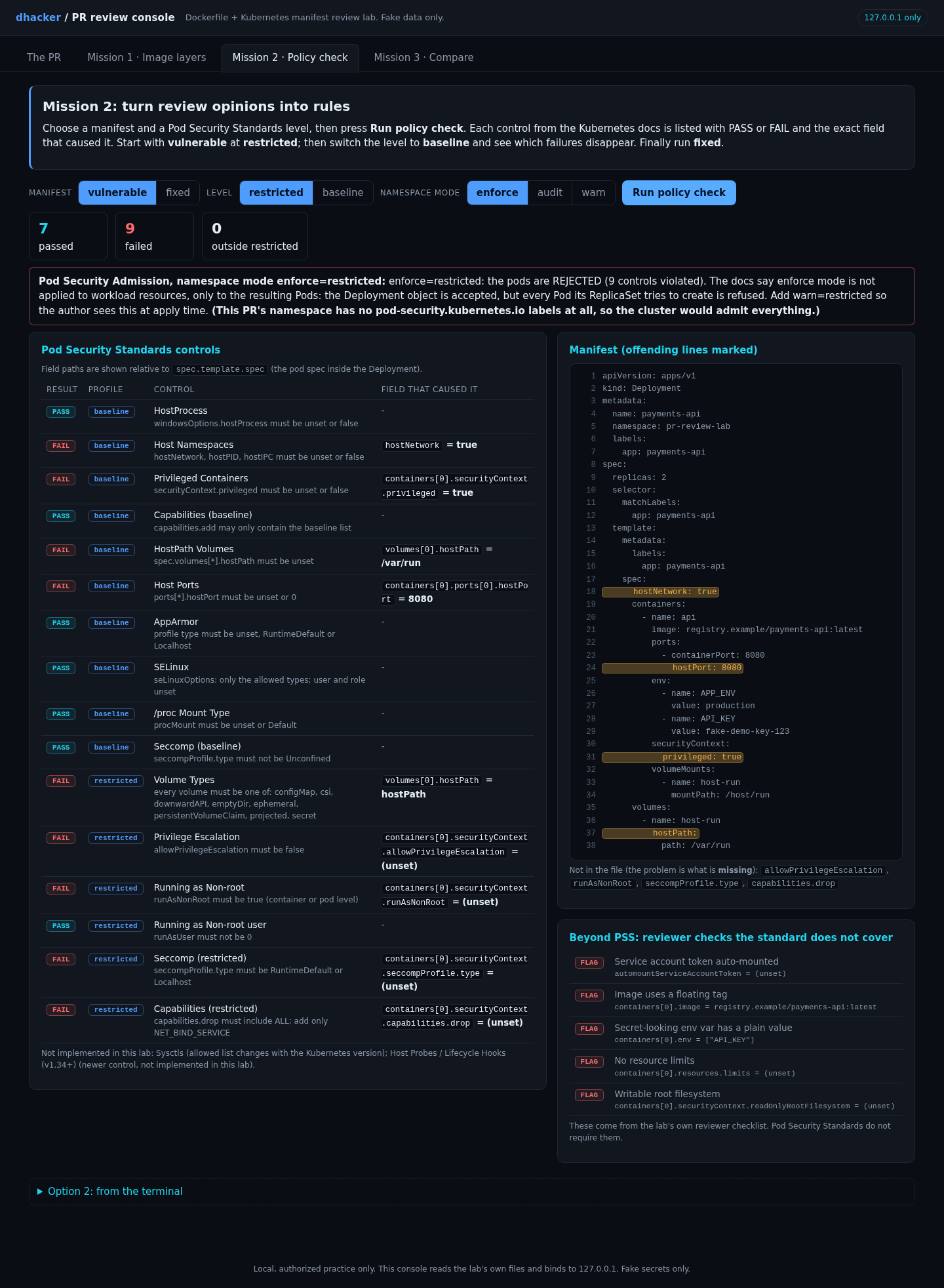
On Mission 2 choose vulnerable, level restricted, and press Run policy check. Each control from the PSS tables shows PASS or FAIL and the field that caused it. Count the failures. Then switch the level to baseline. Which failures remain, and why do they matter more?
Option 2: from the terminal
docker run --rm -v "$PWD:/w:ro" -w /w ghcr.io/yannh/kubeconform:v0.8.0 -summary -strict vulnerable/k8s/deployment.yaml
docker run --rm -v "$PWD:/w:ro" -w /w openpolicyagent/conftest:v0.71.1 test \
  --policy policy -n pss.baseline -n pss.restricted vulnerable/k8s/deployment.yaml
Show solution
Solution: Mission 2
kubeconform reports Valid: 1 for the vulnerable manifest: schema-valid is not safe. Conftest (the Rego version of the same controls) reports 9 failures:
FAIL - ... - pss.baseline - host-namespaces: spec.template.spec.hostNetwork
FAIL - ... - pss.baseline - host-ports: spec.template.spec.containers[0].ports[0].hostPort
FAIL - ... - pss.baseline - hostpath: spec.template.spec.volumes[0].hostPath
FAIL - ... - pss.baseline - privileged: spec.template.spec.containers[0].securityContext.privileged
FAIL - ... - pss.restricted - capabilities-restricted: ...securityContext.capabilities.drop
FAIL - ... - pss.restricted - privilege-escalation: ...securityContext.allowPrivilegeEscalation
FAIL - ... - pss.restricted - run-as-non-root: ...securityContext.runAsNonRoot
FAIL - ... - pss.restricted - seccomp-restricted: ...securityContext.seccompProfile.type
FAIL - ... - pss.restricted - volume-types: spec.template.spec.volumes[0]
At baseline four remain: host namespaces, host ports, hostPath and privileged. Those are the ones that break isolation outright; the restricted-only ones are missing hardening. The console also shows five "beyond PSS" flags (floating tag, plain-text secret, no limits, writable root filesystem, token mounted) that no PSS control covers.
The checker implements 16 controls and the UI names the two it skips (Sysctls and the v1.34+ host probes control). It is a teaching tool; the real controller is the authority, and the optional kind section below runs it.
Mission 3: compare vulnerable and fixed
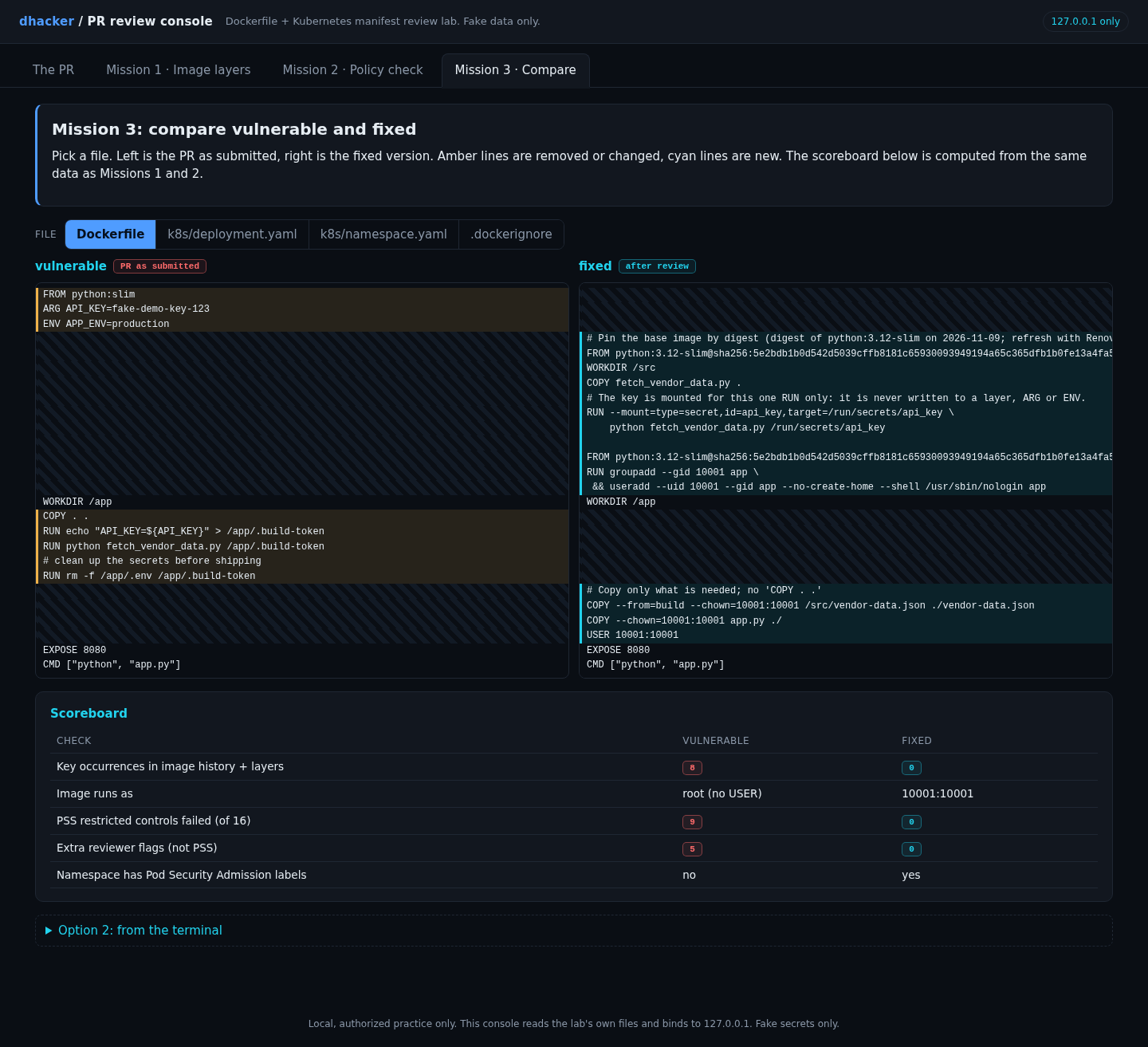
On Mission 3 pick Dockerfile, then k8s/deployment.yaml. Amber lines are removed or changed, cyan lines are new. The scoreboard under the diff is computed from Missions 1 and 2.
Option 2: from the terminal
diff -u vulnerable/Dockerfile fixed/Dockerfile
docker run --rm dhacker-pr-review/api-vulnerable:lab id    # uid=0(root)
docker run --rm dhacker-pr-review/api-fixed:lab id         # uid=10001(app)
Show solution
Solution: Mission 3
The scoreboard reads: key occurrences 8 vs 0, image runs as root (no USER) vs 10001:10001, PSS restricted failures 9 vs 0, extra reviewer flags 5 vs 0, namespace PSA labels no vs yes.
Fixing it
Fix 1: no secret in the image
The fixed Dockerfile pins the base by digest, builds in a separate stage, mounts the key for a single step, copies only the files it needs, and sets a non-root USER:
FROM python:3.12-slim@sha256:5e2bdb1b0d542d5039cffb8181c65930093949194a65c365dfb1b0fe13a4fa5b AS build
WORKDIR /src
COPY fetch_vendor_data.py .
RUN --mount=type=secret,id=api_key,target=/run/secrets/api_key \
    python fetch_vendor_data.py /run/secrets/api_key

FROM python:3.12-slim@sha256:5e2bdb1b0d542d5039cffb8181c65930093949194a65c365dfb1b0fe13a4fa5b
RUN groupadd --gid 10001 app \
 && useradd --uid 10001 --gid app --no-create-home --shell /usr/sbin/nologin app
WORKDIR /app
COPY --from=build --chown=10001:10001 /src/vendor-data.json ./vendor-data.json
COPY --chown=10001:10001 app.py ./
USER 10001:10001
CMD ["python", "app.py"]
Build it with docker build --secret id=api_key,src=secrets/api_key.txt . (the compose file passes the same secret via secrets:); docker history of the result contains no key. A .dockerignore excluding .env, *.pem, .git and k8s/ backs it up. The digest is the one for python:3.12-slim on 2026-11-09; refresh it with a bot. If a real key ever landed in a layer, rotating it is the fix; rebuilding is not.
Fix 2: a manifest the namespace will admit
spec:
  automountServiceAccountToken: false
  securityContext:
    runAsNonRoot: true
    runAsUser: 10001
    seccompProfile: {type: RuntimeDefault}
  containers:
    - name: api
      image: registry.example/payments-api@sha256:<digest-from-ci>
      env:
        - name: API_KEY
          valueFrom: {secretKeyRef: {name: payments-api-secrets, key: api-key}}
      securityContext:
        allowPrivilegeEscalation: false
        readOnlyRootFilesystem: true
        capabilities: {drop: ["ALL"]}
      resources:
        limits: {cpu: 250m, memory: 128Mi}
No privileged, hostNetwork or hostPath; a /tmp emptyDir covers scratch space. The lab’s file also adds a readiness probe.
Fix 3: make the namespace enforce it
apiVersion: v1
kind: Namespace
metadata:
  name: pr-review-lab
  labels:
    pod-security.kubernetes.io/enforce: restricted
    pod-security.kubernetes.io/audit: restricted
    pod-security.kubernetes.io/warn: restricted
Keep warn and audit next to enforce: enforce does not apply to the Deployment itself, so warn is what tells the author at kubectl apply time.
Re-testing the fixes
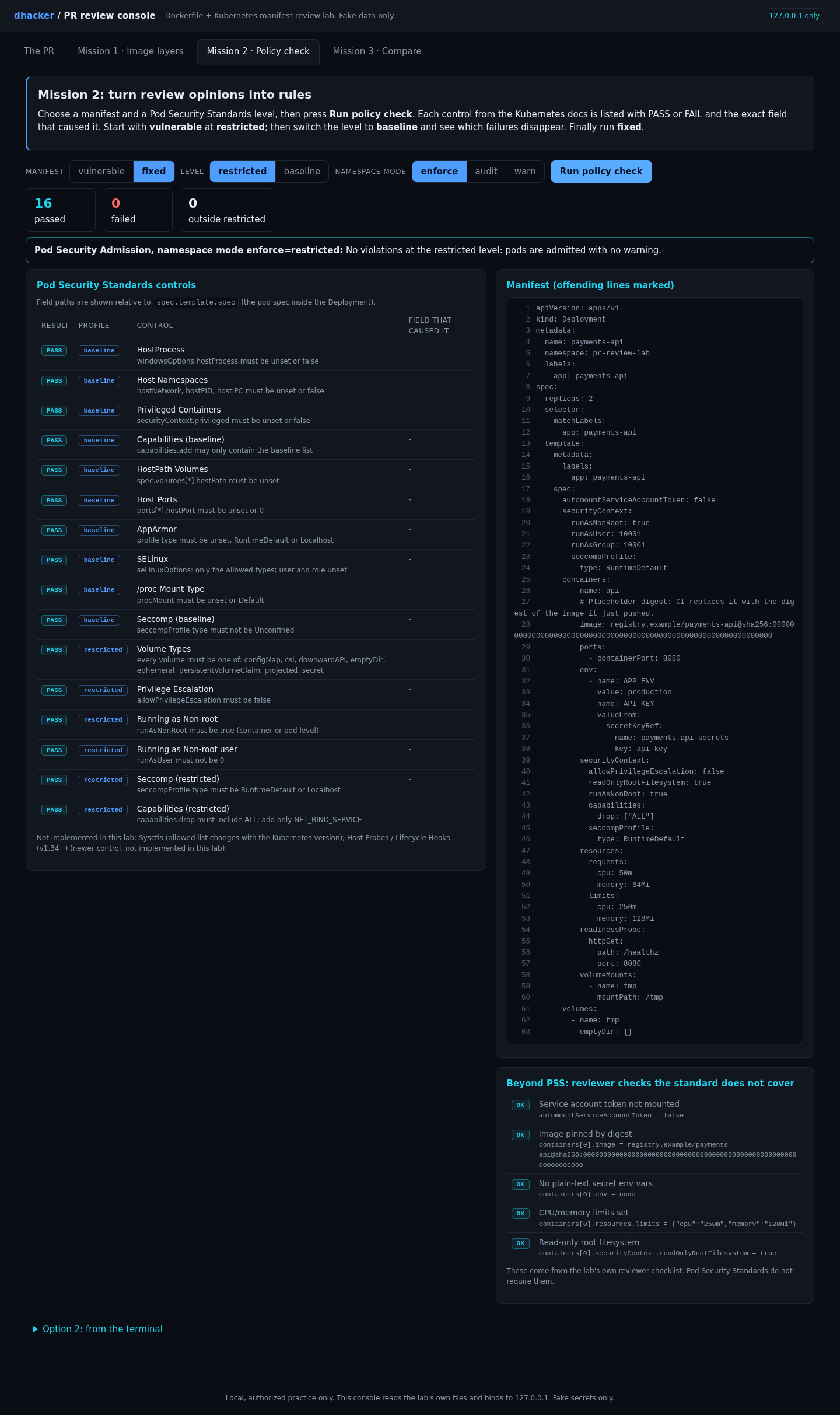
Mission 1 on fixed already showed 0 matches. In Mission 2, fixed at restricted shows 16 passed, 0 failed, and pods admitted.
The lab’s 30 tests (policy cases, Rego-versus-Python agreement, layer contents, live checks) pass from a clean unzip.
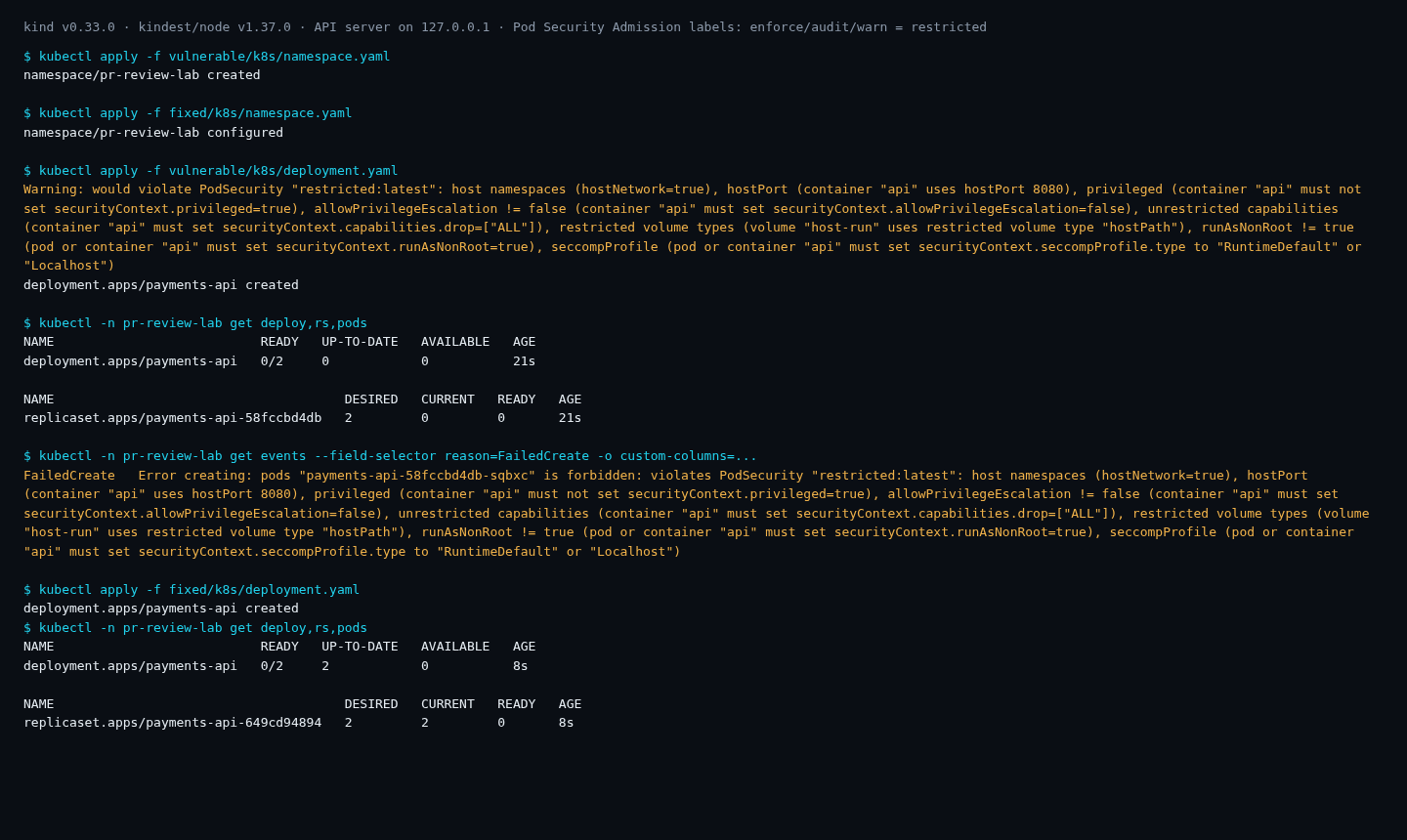
Optional: a real cluster. The lab ships a kind config bound to 127.0.0.1. I ran it with kind v0.33.0 and kindest/node:v1.37.0. Applying the vulnerable Deployment to the labelled namespace returned a would violate PodSecurity "restricted:latest" warning but created the Deployment; its ReplicaSet then logged FailedCreate ... is forbidden: violates PodSecurity for every pod, so nothing privileged ever ran. The fixed Deployment’s pods were admitted (they sit in ErrImagePull, as expected with a placeholder registry). The cluster listed eight reasons where the lab lists nine controls: it names the hostPath volume once, as a restricted volume type.
Vulnerable vs. fixed
| Vulnerable | Fixed | |
|---|---|---|
| Key in history and layers | 8 places | 0 |
| User | root | 10001 |
| Base image | python:slim (floating) |
pinned by digest |
| Secrets | ARG, COPY . ., plain env |
build secret mount, secretKeyRef |
| PSS restricted controls failed | 9 of 16 | 0 |
| Namespace labels | none | enforce/audit/warn = restricted |
Detecting this class of bug
In review and CI. Run the policy on every PR and fail the job on a non-zero exit (Conftest exits 1 on failures, as in the run above). These greps are cheap first filters, verified against the lab:
grep -rnEi "^(ARG|ENV)\s+\w*(KEY|TOKEN|SECRET|PASSWORD)" Dockerfile*   # secret-looking ARG/ENV
grep -nE "^\s*COPY\s+\.\s+\." Dockerfile*                               # COPY . .
grep -L "^USER" Dockerfile*                                             # no USER line
grep -rnE "privileged:\s*true|hostPath:|hostNetwork:\s*true|hostPort:|:latest" k8s/
Greps are filters, not a gate: keep the policy tool as the gate, and scan built images for secrets in layers too.
In the cluster. Label namespaces with enforce, audit and warn. Alert on FailedCreate events that mention violates PodSecurity (a deployment that cannot start) and review the audit annotations that audit mode adds. Any image whose history shows a secret-looking ARG should be treated as exposed: rotate the key.
Reviewer checklist
- [ ] Base image pinned by digest, not
latestor a floating tag? - [ ] Any secret in
ARG,ENV,COPYor a file written then deleted? - [ ]
.dockerignorepresent andCOPYlimited to what is needed? - [ ]
USERset to a non-root UID in the image? - [ ]
privileged,hostPath,hostNetwork,hostPID,hostIPC,hostPortabsent? - [ ]
allowPrivilegeEscalation: false,capabilities.drop: [ALL],runAsNonRoot: true,seccompProfile: RuntimeDefault? - [ ] Secrets from
secretKeyRefor an external store, notvalue:? - [ ] Limits set, root filesystem read-only, service-account token off if unused?
- [ ] Namespace labelled
enforce: restricted(plusauditandwarn)? - [ ] Image scanned in CI?
Self-check
- Why does
RUN rmin a later step not remove a secret from the image? - Which single field would you reject on sight, and why?
- What do
enforce,auditandwarneach do, and which one applies to a Deployment itself? - Why was
docker run ... cat /app/.envempty while the key was still recoverable? - Name two things a reviewer must check that PSS does not cover.
Key takeaways
- A layer is permanent. Deleting a file later adds a deletion marker; the secret stays in the earlier layer, and
ARGvalues stay indocker history. - Use a BuildKit secret mount for build-time secrets, and rotate any secret that has been in an image.
- Judge
securityContextfields by blast radius:privileged, host namespaces andhostPathbreak isolation, while the restricted fields remove the footholds. - PSS and PSA turn opinions into rules, and
enforceacts on Pods, so pair it withwarnandaudit. PSS does not cover digests, limits, read-only filesystems or plaintext secrets. - Schema-valid is not safe:
kubeconformpassed the vulnerable manifest.
Lab: download and run it
dockerfile-k8s-pr-review/
├── docker-compose.yml        # console :8090, api-vulnerable :8081, api-fixed :8082 (127.0.0.1 only)
├── run.sh / run.ps1          # build -> export layer data -> start
├── vulnerable/               # the PR: Dockerfile, k8s/deployment.yaml, k8s/namespace.yaml, app
├── fixed/                    # digest-pinned multi-stage Dockerfile, restricted manifest, .dockerignore
├── templates/                # fake .env templates that run.sh copies into place
├── policy/                   # pss_check.py + Rego (lib, baseline, restricted) for Conftest
├── console/                  # the web UI (plain HTML/CSS/JS, no CDN) + read-only API
├── tools/inspect_image.py    # docker history / docker save -> data/images.json
├── tests/                    # 30 pytest tests
├── kind/                     # OPTIONAL real-cluster demo
├── PR_DIFF.md, secrets/api_key.txt (fake), README.md
Prerequisites: Docker with Compose v2 and BuildKit, Python 3.9+, a browser, free ports 8090, 8081 and 8082 on 127.0.0.1, and internet for the first build. Tested with Docker 28.5.2 and Compose 2.40.3 on Linux.
unzip dockerfile-k8s-pr-review-lab.zip && cd dockerfile-k8s-pr-review
./run.sh          # Windows: powershell -ExecutionPolicy Bypass -File run.ps1
You should see Ready. Open http://127.0.0.1:8090/. Open it and work through the tabs. For the terminal options and tests:
python3 -m pytest tests -v # 30 passed (needs: pip install pytest pyyaml)Stop and clean up:
docker compose down -v --rmi all
rm -f data/images.json vulnerable/.env fixed/.env
Everything binds to 127.0.0.1 and uses fake data only. The zip contains no files named .env; run.sh creates the fake ones from templates/.