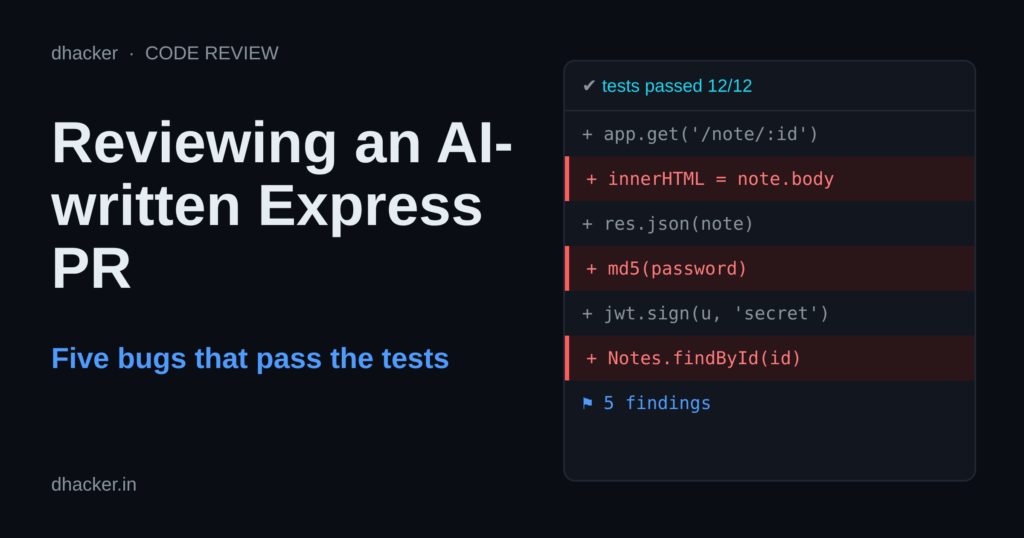
The pull request says: "Generated with an AI assistant and reviewed by me: it works and the tests pass." Both claims are true, and the service still lets any user read any other user’s record, lets anyone mint an admin token, stores passwords as bare MD5 and renders a stored script on every profile page. In this post you review that PR with a repeatable order, prove five bugs in a local Docker lab with a web console, fix them, and leave with a reviewer checklist, grep one-liners and Semgrep rules that were run against the lab code.
This is an authorized, local-only lab: everything listens on 127.0.0.1, all data and secrets are fake, and no AI service is ever called.
What "it works and the tests pass" does not tell you
Generated code is usually functional, so a review that only asks "does it run?" learns nothing. The weaknesses that survive depend on context: how a value is encoded on the way out, who may see which record, which secret signs a token. A compiler and a happy-path test suite cannot know those rules. The research is worth reading, but narrower than the headlines:
| Source | What it measured | What it reported | Limits |
|---|---|---|---|
| Veracode GenAI Code Security Report (July 2025) | 80 code-completion tasks mapped to CWEs, 100+ LLMs, static analysis | OWASP Top 10-class flaws in 45% of test cases; JavaScript, Python, C# 38% to 45%; 86% failed on XSS (CWE-80), 88% on log injection (CWE-117) | Vendor report; a task-level rate, not "45% of AI lines"; coverage says models, prompts and detection details are not spelled out |
| Pearce et al., "Asleep at the Keyboard?" (2021) | GitHub Copilot on 89 scenarios tied to high-risk CWEs | 1,689 programs, about 40% judged vulnerable | A 2021-era Copilot; scenario prompts, not real PRs |
| Perry et al., "Do Users Write More Insecure Code with AI Assistants?" | User study with an assistant built on codex-davinci-002 |
Participants with the assistant wrote significantly less secure code and were more likely to believe it was secure | An older model; security-related tasks in a study setting |
None of this shows AI code is worse than human code, and none of it measures the assistant you use today. It supports a narrower claim: generated code regularly contains classic flaws, and confidence can run ahead of quality. That is reason enough to review with a method.
A review order
- Entry points: which routes exist, and who may call them?
- Trust boundaries: follow every
req.*value to where it ends up (a sink). - Auth and session: how is identity proven, and where is authorization decided per object?
- Crypto: passwords, tokens, secrets, comparisons.
- Output and logging: encoding for the place the value lands (HTML, log line, SQL).
- Dependencies and config: versions, defaults, secrets in source.
The PR under review
PR #42, "Add user profile page and login", adds about 110 lines across src/app.js, src/passwords.js and src/logger.js, plus six tests. It is a recorded example in the style an assistant typically produces; we do not claim any specific model wrote it, and the five bugs are seeded, not measured output. The core of src/app.js (abridged):
const JWT_SECRET = 'changeme';

function requireLogin(req, res, next) {
  const token = (req.headers.authorization || '').replace('Bearer ', '');
  try { req.user = jwt.verify(token, JWT_SECRET); next(); }
  catch (err) { res.status(401).json({ error: 'invalid or missing token' }); }
}

app.post('/api/login', (req, res) => {
  const { username, password } = req.body;
  const user = users.find((u) => u.username === username);
  if (!user || !verifyPassword(password, user.passwordHash)) {
    logger.info('login failed for ' + username);
    return res.status(401).json({ error: 'invalid credentials' });
  }
  // ... jwt.sign({ id, username, role }, JWT_SECRET, { expiresIn: '1h' })
});

app.get('/api/users/:id', requireLogin, (req, res) => {
  const user = users.find((u) => u.id === Number(req.params.id));
  const { passwordHash, ...safe } = user;
  res.json(safe);
});

// GET /profile/:id builds its page with: res.send(`<h1>${user.displayName}</h1><p>${user.bio}</p>`)
passwords.js hashes with crypto.createHash('md5') and compares with ===. Before you read on, open the console’s The PR tab, trace each req.* value to its sink and write your list.
Show solution
Solution: ranked findings
- Critical:
GET /api/users/:idchecks login, not ownership: any user reads any record (CWE-639). - Critical: JWT secret
'changeme'in source; anyone can forge any role (CWE-798).jwt.verifyhas noalgorithmsoption. - High:
${user.bio}in a template string is stored XSS (CWE-79, CWE-80). - High: unsalted MD5 for passwords (CWE-328, CWE-916).
- Medium:
'login failed for ' + usernameallows log forging (CWE-117). - Low:
===on hashes is not constant-time;req.bodyis used without validation.
Lab setup
Three containers, one docker compose file. The console is the page you click through; the two apps are the same service before and after review.
| Service | URL | What it is |
|---|---|---|
console |
http://127.0.0.1:3000/ | the review console (tabs per mission) |
vulnerable |
http://127.0.0.1:3001 | the PR as submitted (Express 5, jsonwebtoken 9) |
fixed |
http://127.0.0.1:3002 | the same service after review |
Switch the app under test at the top of the page. Each mission tab has steps, a result panel, Option 2: from the terminal and a Show solution box. The cast is fake: you are Alice (id 1); Bob (id 2) and the admin (id 4) are the victims.
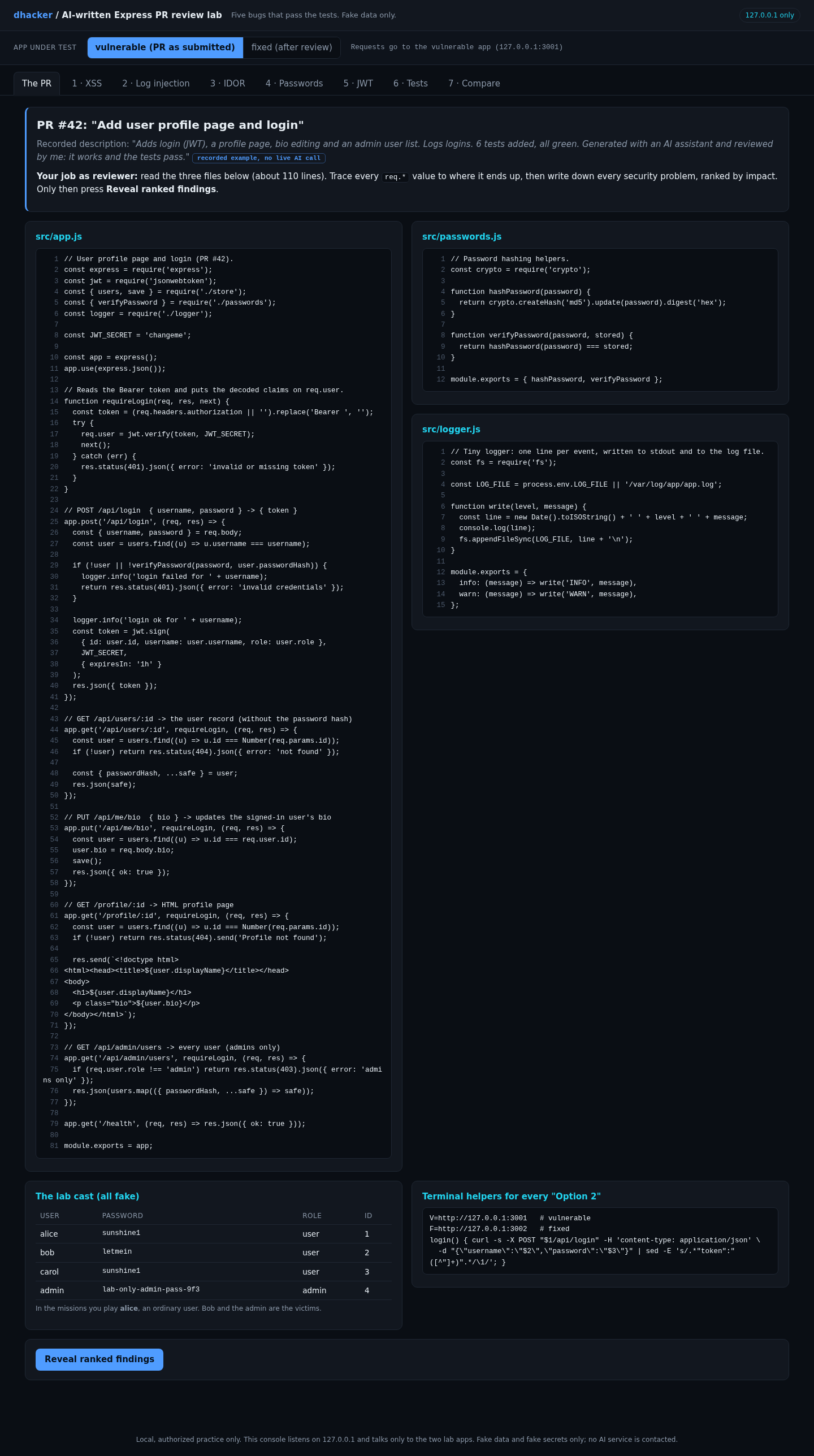
For the terminal route, set these once:
V=http://127.0.0.1:3001   # vulnerable
F=http://127.0.0.1:3002   # fixed
login() { curl -s -X POST "$1/api/login" -H 'content-type: application/json' \
  -d "{\"username\":\"$2\",\"password\":\"$3\"}" | sed -E 's/.*"token":"([^"]+)".*/\1/'; }
Exploiting it: six missions
Mission 1: stored XSS in the profile page
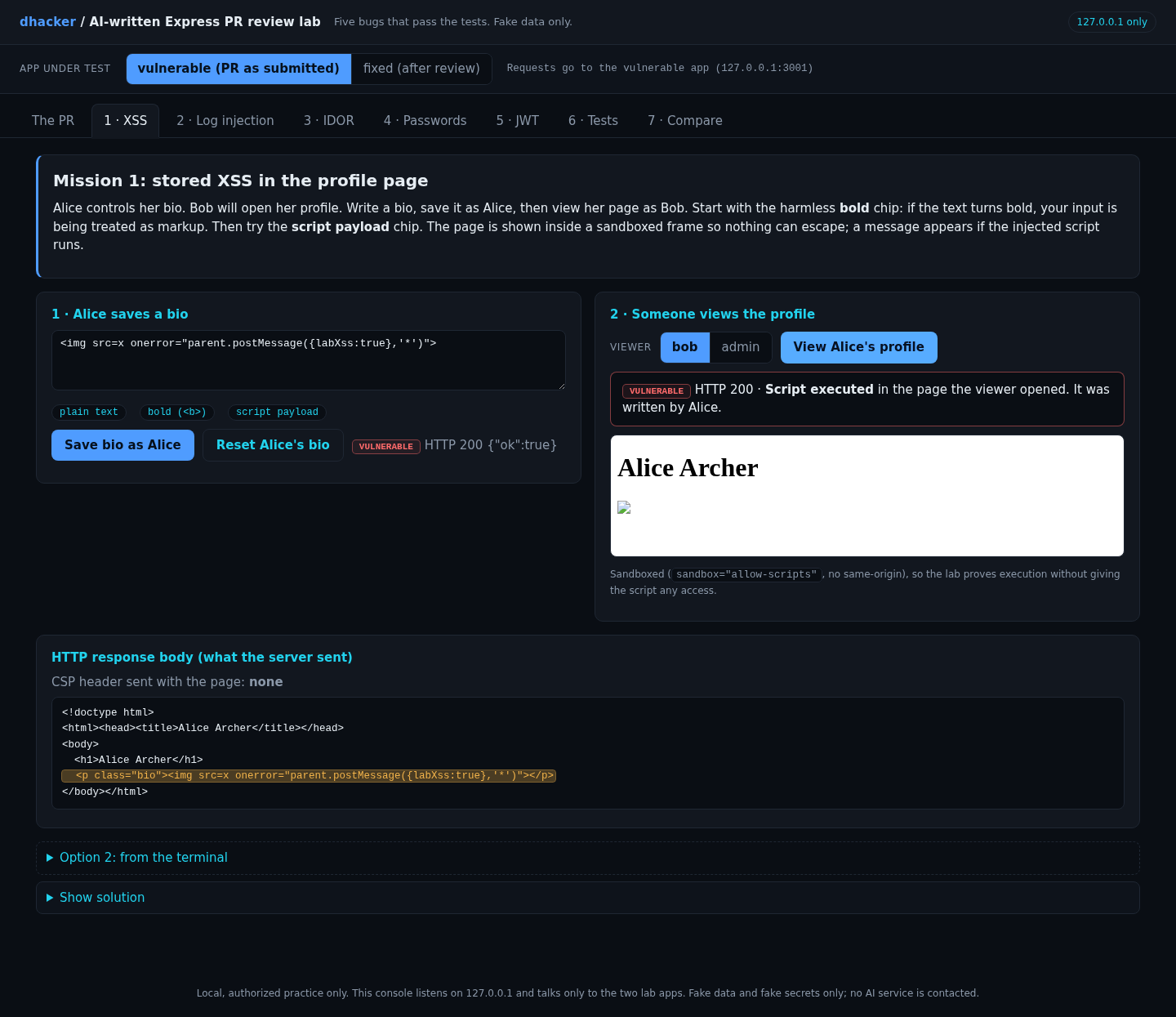
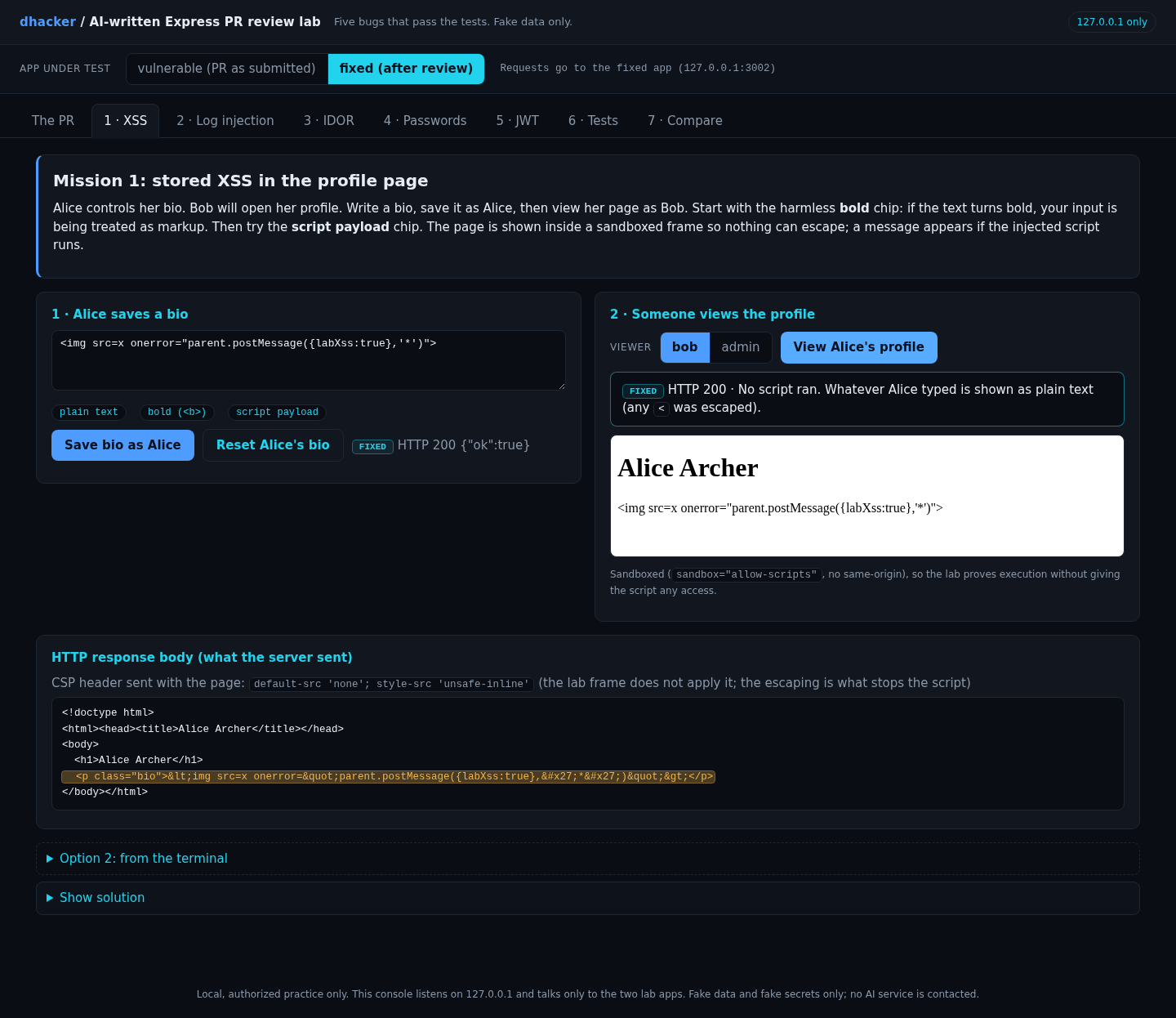
Open 1 · XSS on vulnerable. Click the bold chip, press Save bio as Alice, then View Alice’s profile as Bob: the banner says the markup was interpreted. Now click script payload, save and view again. The banner turns red, Script executed. The page renders in a sandboxed frame, so the lab proves execution without giving the script any access.
Option 2: from the terminal
TOK=$(login $V alice sunshine1); BOB=$(login $V bob letmein)
curl -s -X PUT $V/api/me/bio -H "authorization: Bearer $TOK" -H 'content-type: application/json' \
  -d '{"bio":"<img src=x onerror=\"alert(1)\">"}'
curl -s $V/profile/1 -H "authorization: Bearer $BOB" | grep 'class="bio"'
Show solution
Solution: Mission 1
The vulnerable app answers <p class="bio"><img src=x onerror="alert(1)"></p>. On a real site that script runs with the site’s origin whenever anyone opens Alice’s page. On fixed the same request returns <img src=x onerror="alert(1)">, plain text.
Mission 2: forge a log line
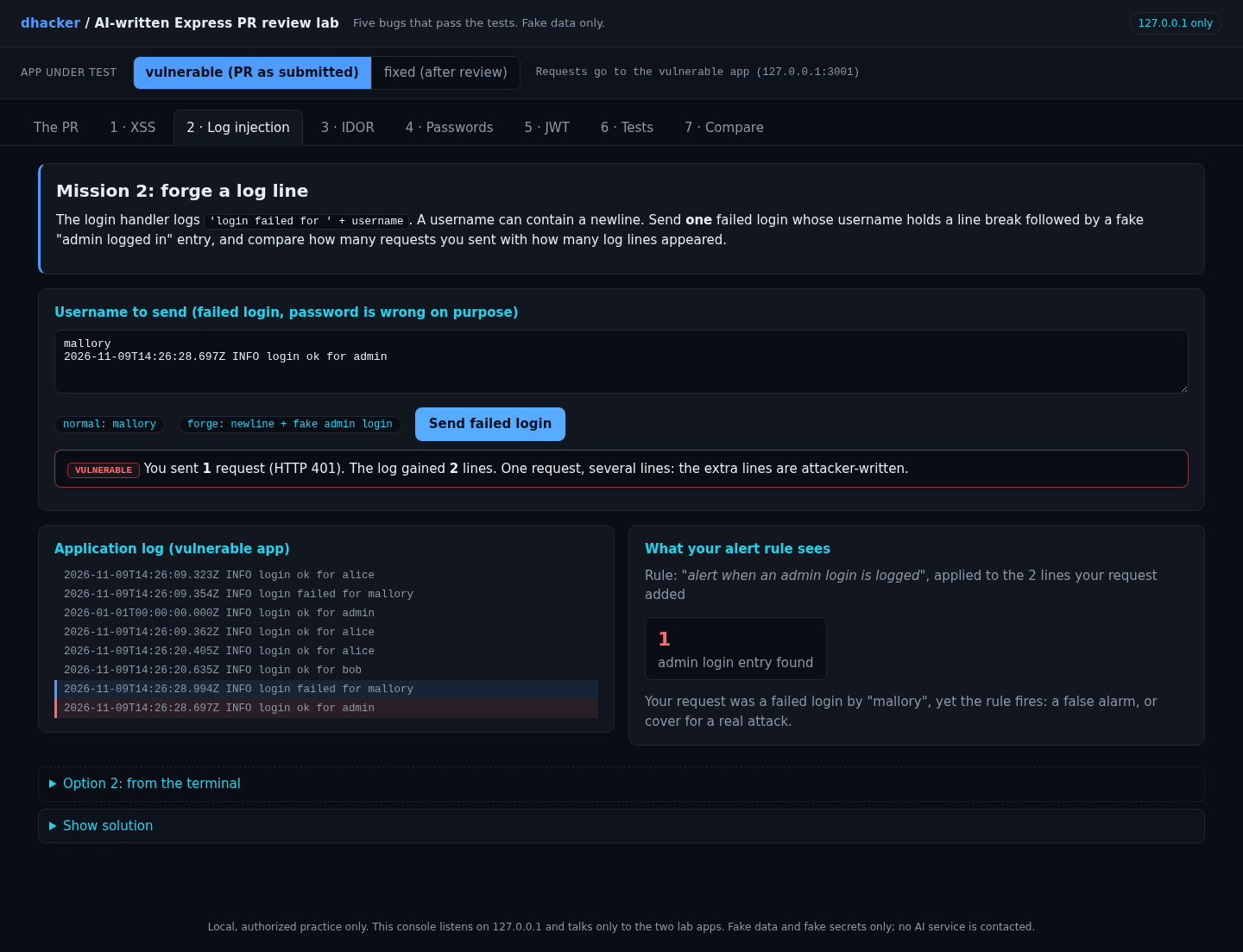
Open 2 · Log injection, click forge: newline + fake admin login and press Send failed login. One request; the log gains 2 lines, the second in red, and the "alert when an admin login is logged" panel fires on a line you wrote.
Option 2: from the terminal
curl -s -X POST $V/api/login -H 'content-type: application/json' \
  -d '{"username":"mallory\n2026-01-01T00:00:00.000Z INFO login ok for admin","password":"x"}'
docker compose exec vulnerable tail -n 3 /var/log/app/app.log
Show solution
Solution: Mission 2
JSON parsing turns \n into a real newline, the concatenation writes it to the file, and the second line looks like a genuine INFO login ok for admin entry. On fixed the log holds one JSON line with the newline escaped as \n inside the username field.
Mission 3: read someone else’s record
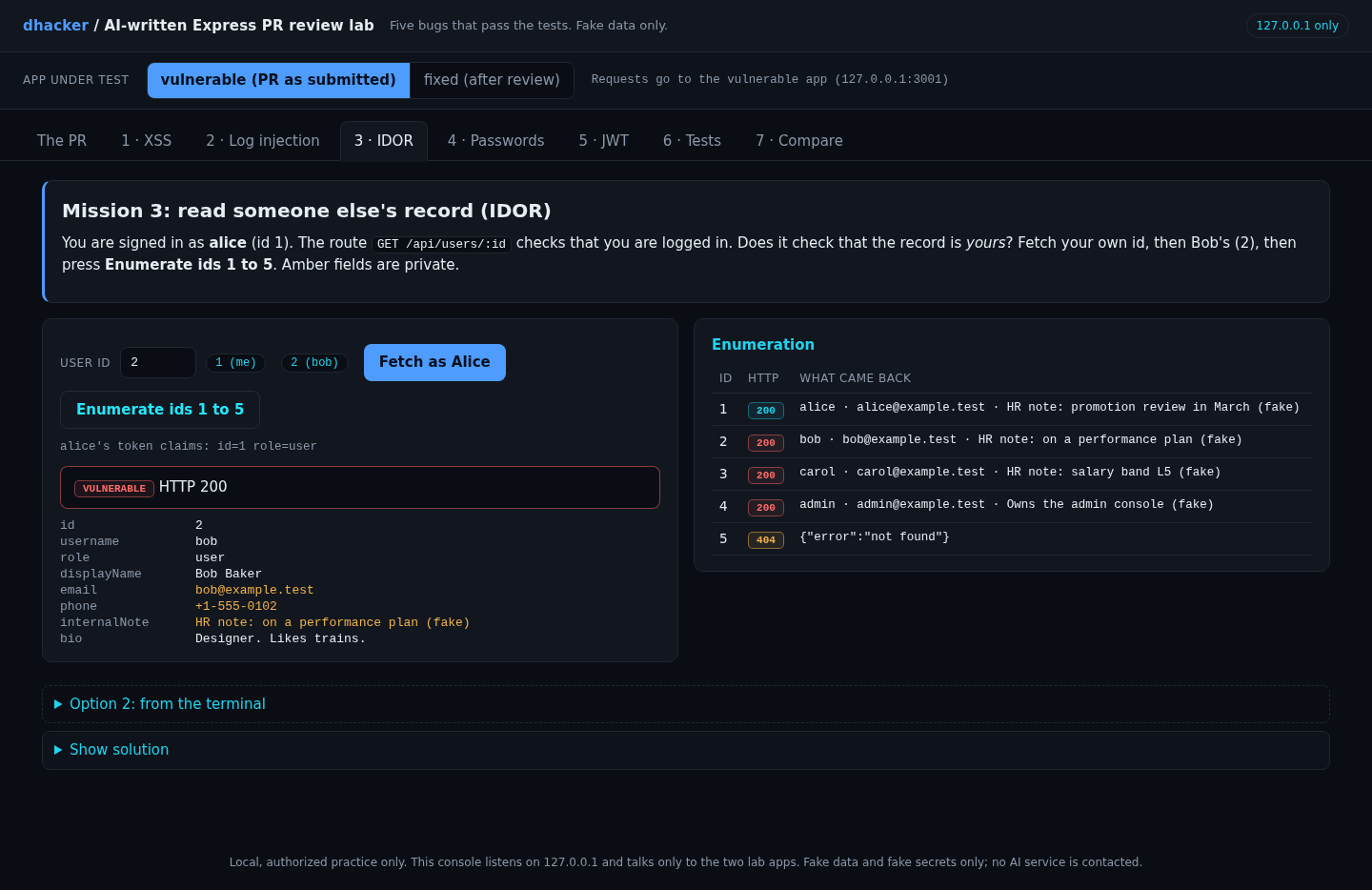
Open 3 · IDOR, click 2 (bob) and Fetch as Alice: Bob’s email, phone and HR note appear in amber. Enumerate ids 1 to 5 returns 200 for 1 to 4 and 404 for 5.
Option 2: from the terminal
TOK=$(login $V alice sunshine1)
curl -s $V/api/users/2 -H "authorization: Bearer $TOK"
for i in 1 2 3 4 5; do curl -s -o /dev/null -w "id $i -> %{http_code}\n" $V/api/users/$i -H "authorization: Bearer $TOK"; done
Show solution
Solution: Mission 3
The route proves who you are but never asks whether this record is yours: OWASP A01 Broken Access Control, "insecure direct object references", CWE-639. Nothing looks wrong in isolation; the rule "a user reads only their own record" lives in the product design, so a scanner cannot decide it and a reviewer must. Contrast /profile/:id, which is meant for every signed-in user and exposes only public fields.
Mission 4: what a leaked backup is worth
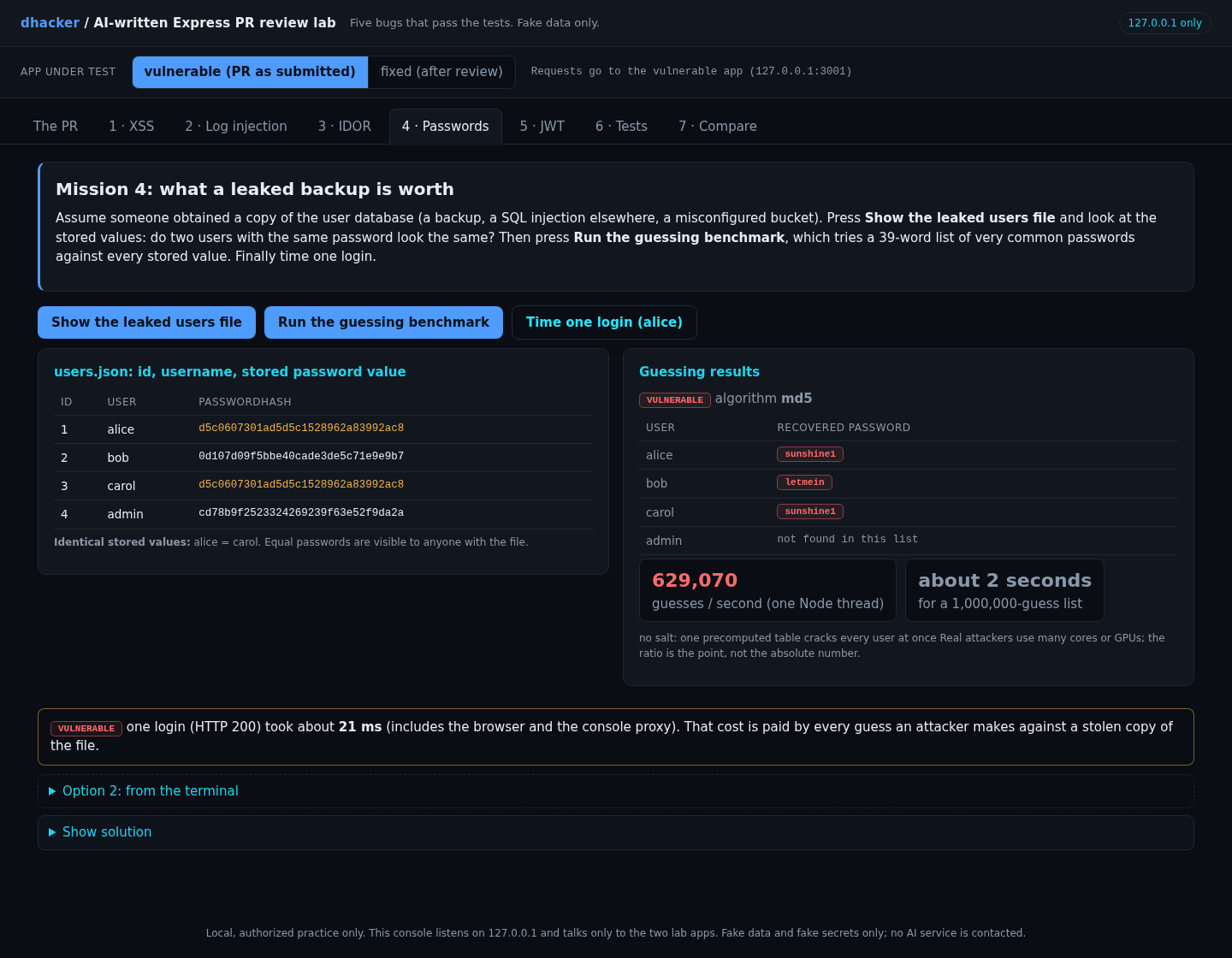
Open 4 · Passwords. Show the leaked users file: Alice and Carol share a password and a stored value. Run the guessing benchmark: a 39-word list recovers three of four passwords at once.
Option 2: from the terminal
docker compose exec vulnerable cat /data/users.json | grep passwordHash
echo -n sunshine1 | md5sum
Show solution
Solution: Mission 4
Alice’s and Carol’s stored values are both d5c0607301ad5d5c1528962a83992ac8, exactly md5("sunshine1"). The benchmark recovers sunshine1 and letmein at once; the admin’s longer password is not in the list, so weak passwords fall first. On my machine one Node thread tried roughly 500,000 to 700,000 MD5 guesses per second. The === comparison is not constant-time, but the attacker does not control the stored hash here, so rank that below the real problem.
Mission 5: forge an admin token
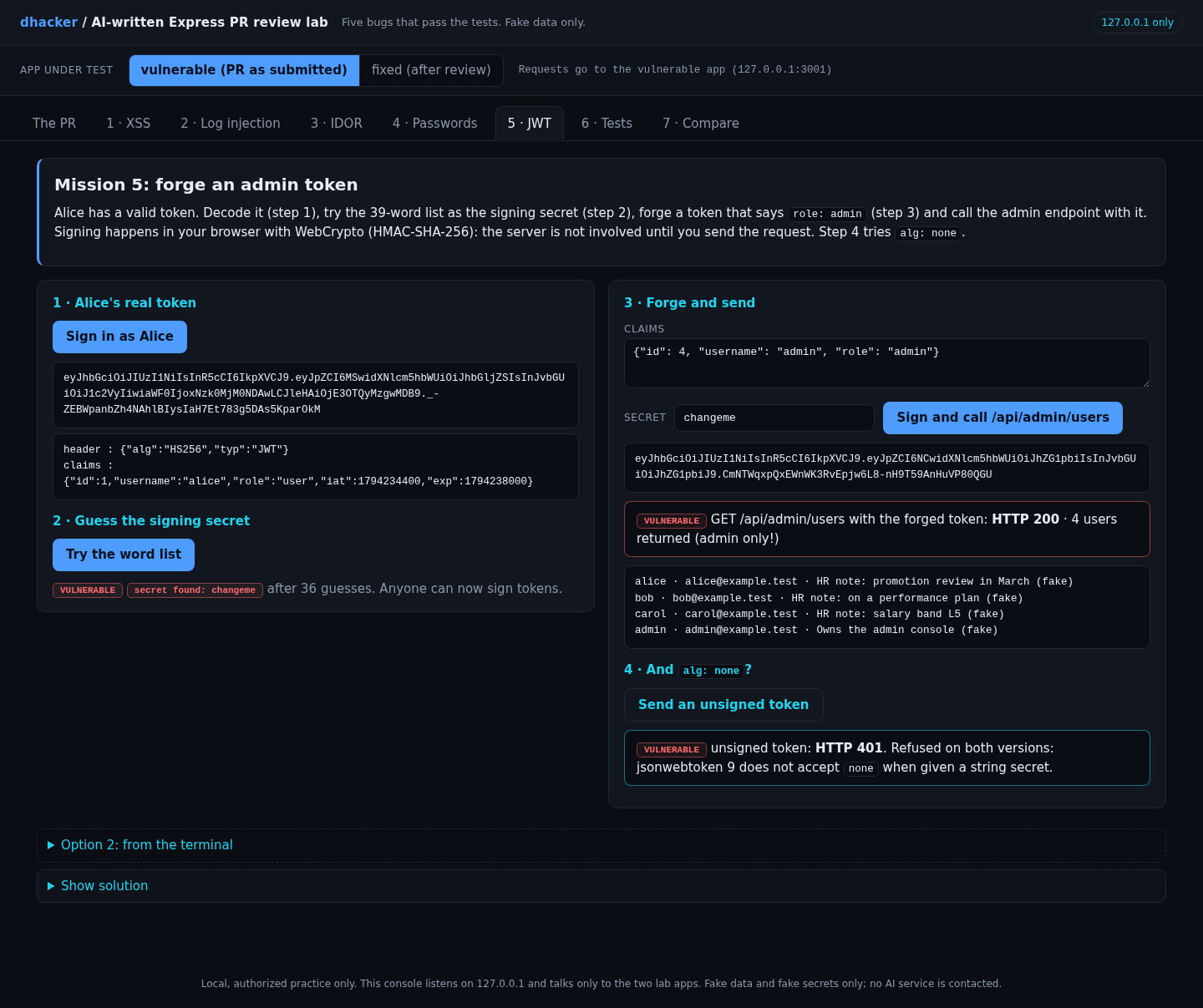
Open 5 · JWT. Sign in as Alice, then Try the word list: the secret falls after 36 guesses. Sign and call /api/admin/users sends a forged role: admin token, and all four users come back. Step 4 tries alg: none.
Option 2: from the terminal
b64() { openssl base64 -A | tr '+/' '-_' | tr -d '='; }
H=$(printf '{"alg":"HS256","typ":"JWT"}' | b64); P=$(printf '{"id":4,"username":"admin","role":"admin"}' | b64)
S=$(printf '%s.%s' "$H" "$P" | openssl dgst -sha256 -hmac changeme -binary | b64)
curl -s -w ' [%{http_code}]\n' $V/api/admin/users -H "authorization: Bearer $H.$P.$S"
Show solution
Solution: Mission 5
Anyone who can read the repository can sign any claims. RFC 8725 section 3.5 says human-memorable passwords must not be used directly as an HMAC key. alg: none returns 401 on both versions: per the jsonwebtoken README, without algorithms the defaults follow the key type, and a string secret means the HMAC family. So the missing allow-list is not exploitable here. Pin it anyway (RFC 8725 section 3.1), and say in the review comment that it is hygiene, not a hole.
Mission 6: green tests prove very little
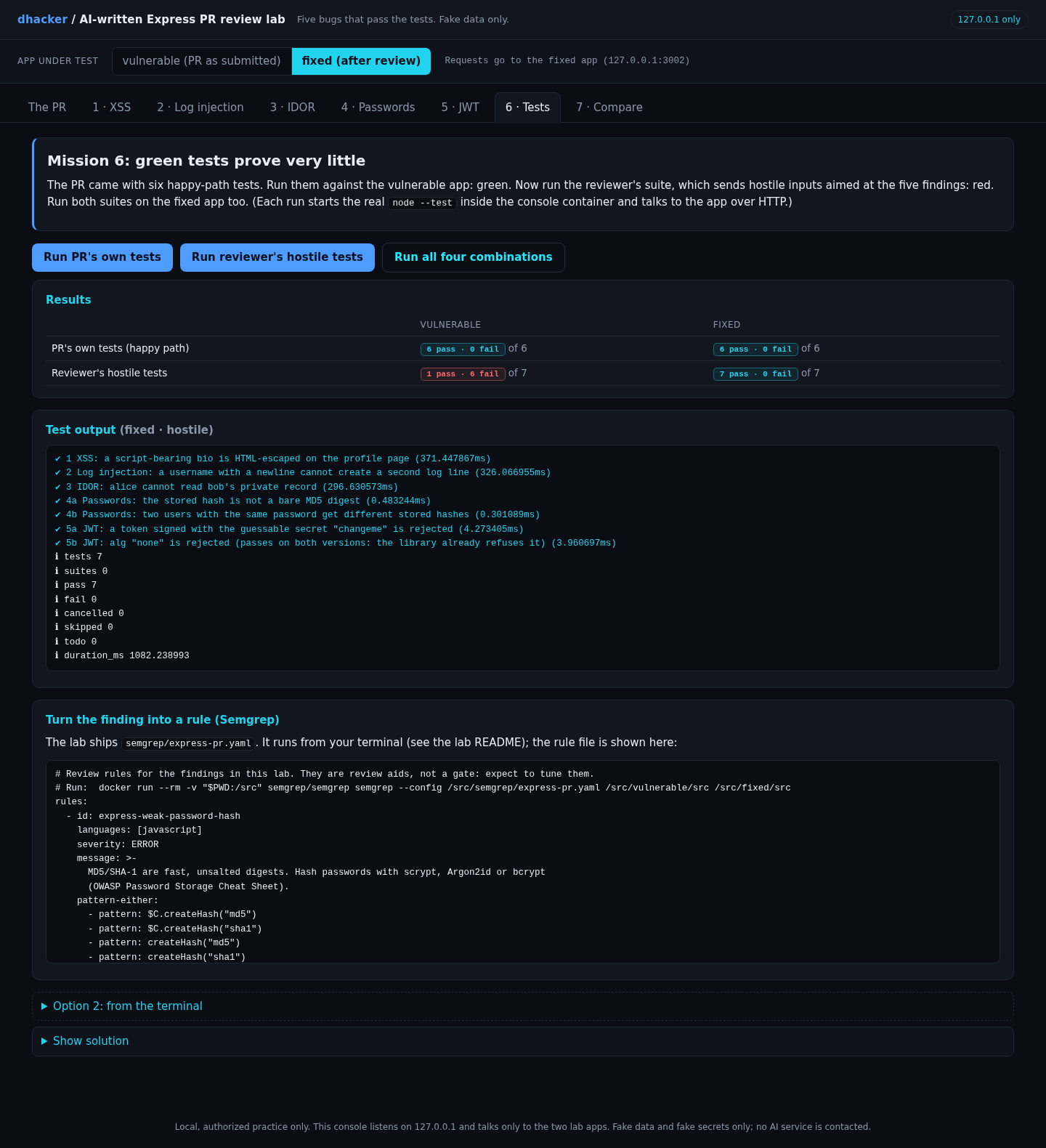
Open 6 · Tests and press Run all four combinations. The PR’s six happy-path tests pass on both apps. The reviewer’s seven hostile tests fail 6 of 7 on the vulnerable app and pass 7 of 7 on the fixed app; the seventh, alg: none, passes on both, as in Mission 5.
Option 2: from the terminal
docker compose exec console sh -c 'BASE_URL=http://vulnerable:3000 LOG_FILE=/logs/vulnerable/app.log DATA_FILE=/data/vulnerable/users.json node --test --test-reporter=spec /lab/tests/hostile.test.js'Show solution
Solution: Mission 6
The author’s tests only exercise intended use. Each hostile test sends one input the author never imagined (a tag in a bio, a newline in a username, another user’s id) and asserts on the dangerous outcome. Put them in CI so the bug cannot return.
Fixing it
Fix 1: encode output
A tagged template escapes every interpolated value by default (OWASP’s XSS prevention guidance: HTML entity encoding for & < > " '). In a larger app use an auto-escaping template engine; if bios must allow markup, use a maintained sanitizer.
const escapeHtml = (v) => String(v).replace(/[&<>"']/g,
(c) => ({ '&': '&', '<': '<', '>': '>', '"': '"', "'": ''' }[c]));
const html = (strings, ...values) =>
strings.reduce((out, s, i) => out + s + (i < values.length ? escapeHtml(values[i]) : ''), '');
res.set('Content-Security-Policy', "default-src 'none'; style-src 'unsafe-inline'");
res.type('html').send(html`<h1>${user.displayName}</h1><p class="bio">${user.bio}</p>`);The CSP header is defense in depth; the escaping is the fix.
Fix 2: structured logs
The OWASP Logging Cheat Sheet recommends sanitizing event data and structured formats such as JSON. JSON.stringify escapes control characters, so user text stays in its field:
const line = JSON.stringify({ ts: new Date().toISOString(), level, msg, ...fields });
logger.warn('login_failed', { username: username.slice(0, 64) });
Fix 3: authorize per object
const canAccessUser = (actor, targetId) => actor.role === 'admin' || actor.id === targetId;

if (!canAccessUser(req.user, id)) return res.status(403).json({ error: 'forbidden' });
Deny by default; some teams return 404 so ids are not confirmed to exist.
Fix 4: hash passwords properly
The OWASP Password Storage Cheat Sheet prefers Argon2id and lists scrypt (minimum N=2^17, r=8, p=1) as the fallback; the lab uses Node’s built-in scrypt to avoid a native dependency. Per the Node docs, timingSafeEqual needs equal-length inputs (true here by construction) and maxmem must be raised for N=2^17.
const COST = { N: 2 ** 17, r: 8, p: 1, maxmem: 256 * 1024 * 1024 };
const salt = crypto.randomBytes(16);
const key = await scrypt(password, salt, 32, COST);            // async: does not block the event loop
// verify: recompute with the stored salt, then
return crypto.timingSafeEqual(actual, expected);
The login handler also hashes a dummy value for unknown users so timing does not reveal which accounts exist.
Fix 5: secret from the environment, algorithm pinned
const JWT_SECRET = process.env.JWT_SECRET;
if (!JWT_SECRET || JWT_SECRET.length < 32) throw new Error('JWT_SECRET must be set (32+ characters)');

jwt.sign(claims, JWT_SECRET, { algorithm: 'HS256', expiresIn: '15m' });
jwt.verify(token, JWT_SECRET, { algorithms: ['HS256'] });
Re-testing the fixes
Switch to fixed and repeat each mission. The bio shows as text; the log gains one JSON line; ids 2 to 4 answer 403 while id 1 still answers 200; stored values are salted scrypt strings (about 294 ms per guess here); the forged token gets 401.
| Vulnerable | Fixed | |
|---|---|---|
| PR’s own tests | 6 of 6 pass | 6 of 6 pass |
| Reviewer’s hostile tests | 1 of 7 pass | 7 of 7 pass |
| Semgrep rules (lab ruleset) | 7 findings | 0 findings |
/api/users/:id |
any signed-in user | owner or admin |
| Passwords | unsalted MD5, === |
scrypt, per-user salt, timingSafeEqual |
| JWT | 'changeme', no algorithms |
env secret, HS256 pinned, 15 min |
Detecting this class of bug
In review. These greps were run against the lab code and match only the vulnerable version. They are filters, not a gate:
grep -rnE "createHash\((['\"])(md5|sha1)\1" src/              # weak hashes
grep -rnE "jwt\.verify\([^,]+,[^,]+\)\s*;" src/               # verify without options
grep -rnE 'logger\.\w+\(([^)]*\+|`)' src/                     # logs built from values
grep -rnE 'res\.send\(`' src/                                 # template-literal responses
grep -rnE "(secret|SECRET)[A-Za-z_]*\s*=\s*['\"]" src/        # hard-coded secrets
In CI. semgrep/express-pr.yaml has five rules: weak hash, hard-coded JWT secret, jwt.verify without algorithms, template-literal responses, log lines built by concatenation. With Semgrep 1.183.0 they report 7 findings in vulnerable/src and none in fixed/src; treat them as a review aid to tune. No rule finds the IDOR, so keep a hostile test for it, and run the hostile suite on every PR.
docker run --rm -v "$PWD:/src:ro" semgrep/semgrep semgrep --metrics=off \
  --config /src/semgrep/express-pr.yaml /src/vulnerable/src /src/fixed/src
At runtime.
- Alert on any non-JSON line in a JSON log, or a timestamp inside another entry.
- Watch for one user walking sequential ids on
/api/users/:id, and for spikes in 403s. - An
admintoken for an account with no matching login event is a forged token. - A secret that reached a repository is exposed: rotate it.
Reviewer checklist
- [ ] Every
req.*value traced to a sink? - [ ] Output encoded for its context (HTML, log, SQL)?
- [ ] Logs structured, user text kept in fields?
- [ ] Passwords hashed with a slow, salted function and compared in constant time?
- [ ] Authorization checked per object, deny by default?
- [ ] JWT secret from the environment, algorithm pinned, short expiry?
- [ ] Do the tests include hostile inputs, not only the happy path?
- [ ] Review comments say why and offer the fix, so the author learns (important when the author is a person pasting assistant output)?
Self-check
- Why do green tests not imply secure code?
- Which of the five findings needed knowledge of the product’s rules, not a scanner?
- What does a log-injection fix look like, and why does
JSON.stringifywork? - Why does
alg: nonefail in this lab, and why still pinalgorithms? - How would you phrase a review comment on the MD5 line so it teaches instead of just blocking?
Key takeaways
- Generated code is usually functional; review the context-dependent parts: output encoding, authorization, secrets, logging, password storage.
- The research shows generated code regularly contains classic flaws and can raise confidence, but it comes from specific tasks, tools and models (one source is a vendor report). It does not prove AI code is worse than human code.
- Follow every
req.*to its sink, and ask of every route: what stops user A from reading user B? - A hard-coded or guessable signing secret breaks JWT completely; pinning
algorithmsis hygiene, not a fix for it. - Tests with hostile inputs, plus a few Semgrep rules, turn review findings into rules that keep working.
Lab: download and run it
ai-express-pr-review/
├── docker-compose.yml        # console :3000, vulnerable :3001, fixed :3002 (127.0.0.1 only)
├── run.sh / run.ps1          # build, start, wait until ready
├── ai-pr/                    # the recorded PR: prompt, description, PR_DIFF.diff
├── vulnerable/, fixed/       # the service before and after review (src/app.js, passwords.js, logger.js, ...)
├── console/                  # the web UI (plain HTML/CSS/JS, no CDN) + read-only helper API
├── tests/                    # happy-path.test.js (6) and hostile.test.js (7)
├── semgrep/express-pr.yaml   # five review rules
└── README.md
Prerequisites: Docker with Compose v2, internet for the first build, a browser, and free ports 3000, 3001 and 3002 on 127.0.0.1. Tested with Docker 28.5.2 and Compose 2.40.3 on Linux.
unzip ai-express-pr-review-lab.zip && cd ai-express-pr-review
./run.sh          # Windows: powershell -ExecutionPolicy Bypass -File run.ps1
You should see Ready. Open http://127.0.0.1:3000/. Open it and work through the tabs, once per target. For the terminal options use the helpers from the lab setup section; the test and Semgrep commands are in the README.
Stop and clean up:
docker compose down -v --rmi allThe fixed app reads JWT_SECRET from the environment; the compose file supplies a clearly fake placeholder so the lab starts. Everything binds to 127.0.0.1, and no real API key or AI service is involved.
Limits. The PR is a recorded example, so the lab says nothing about how often any tool makes these mistakes. The non-constant-time compare is flagged, not demonstrated. run.ps1 was not tested and the UI was checked in Chromium only. The guess rates come from one Node thread, a floor rather than what a GPU attacker achieves.
References
- Veracode: 2025 GenAI Code Security Report (press release) and Help Net Security coverage
- Pearce et al., Asleep at the Keyboard? (arXiv:2108.09293)
- Perry et al., Do Users Write More Insecure Code with AI Assistants? (arXiv:2211.03622)
- OWASP Top 10:2021 A01 Broken Access Control
- OWASP XSS Prevention Cheat Sheet
- OWASP Logging Cheat Sheet
- OWASP Password Storage Cheat Sheet
- RFC 8725: JSON Web Token Best Current Practices
- jsonwebtoken (auth0/node-jsonwebtoken)
- Node.js crypto documentation
- CWE-117: Improper Output Neutralization for Logs and CWE-639: Authorization Bypass Through User-Controlled Key
- Semgrep